Advanced Features: Cinematics on the Lighthouse  

The dialogue system carries the conversation; this page adds the presentation. Both features follow the same shape as the system itself: reusable classes that any conversation can use, carrying per-use data on the node, resolving their scene actors at runtime by tag. The conversation's flow does not change; beats gain a camera, and one branch gains an animation.
The screenshots come from one run of the prompts below. The assets are not part of the plugin, and your run will differ in names and layout. The animation prompt needs a skeletal mesh and an animation clip already in your project; the Third Person template ships both.
Camera beats
The camera rides the state stack: a second node class stacked onto a state that already carries its dialogue line, so the keeper speaks and the camera moves on the same beat, with no new states in the graph. The prompt:
Add camera presentation to the Lighthouse without changing the conversation's flow:
- Build a reusable camera beat as a state stack entry, so it rides on existing dialogue states rather than adding new states: a camera state class that, when its state begins, blends the player's view to a camera in the level. These classes will be reused by every conversation in the game, so put them in
/Game/DialogueSystem/Cinematics.- The camera is identified at runtime by actor tag (a per-use property on the node), never by a hard level reference. The blend duration is a per-use property. An option on the node, off by default, blends the view back to whatever the view was when the beat began.
- Use it twice: when the keeper first greets the player, blend to a framed angle over about three quarters of a second and leave the view there; on the first storm-tale line, blend to a second angle with the blend-back option on, so the shot releases when that beat ends.
- Place and tag the two cameras in the level as part of this work, framed on the area in front of the player start.
Compile clean, save, and verify in play-in-editor that the view target actually changes on each beat and releases after the storm shot.
What the camera prompt produces
The prompt produces one class, BP_CameraBeat, with three properties shown on the node: CameraTag, BlendTime, and BlendBackOnEnd. It is stacked onto GreetFirst and StormTale1 with different settings, and two tagged CameraActors are placed in the level. The graph is untouched; both states show a second entry in their stack.
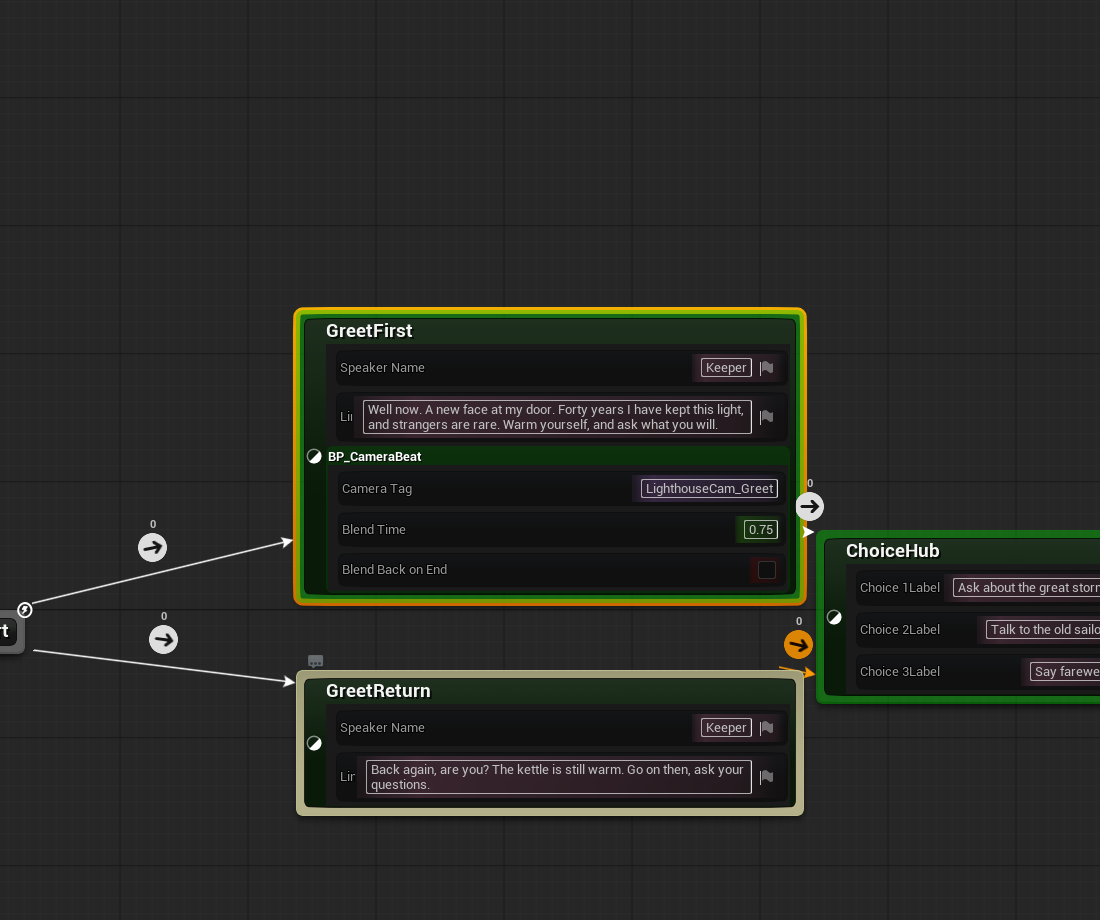
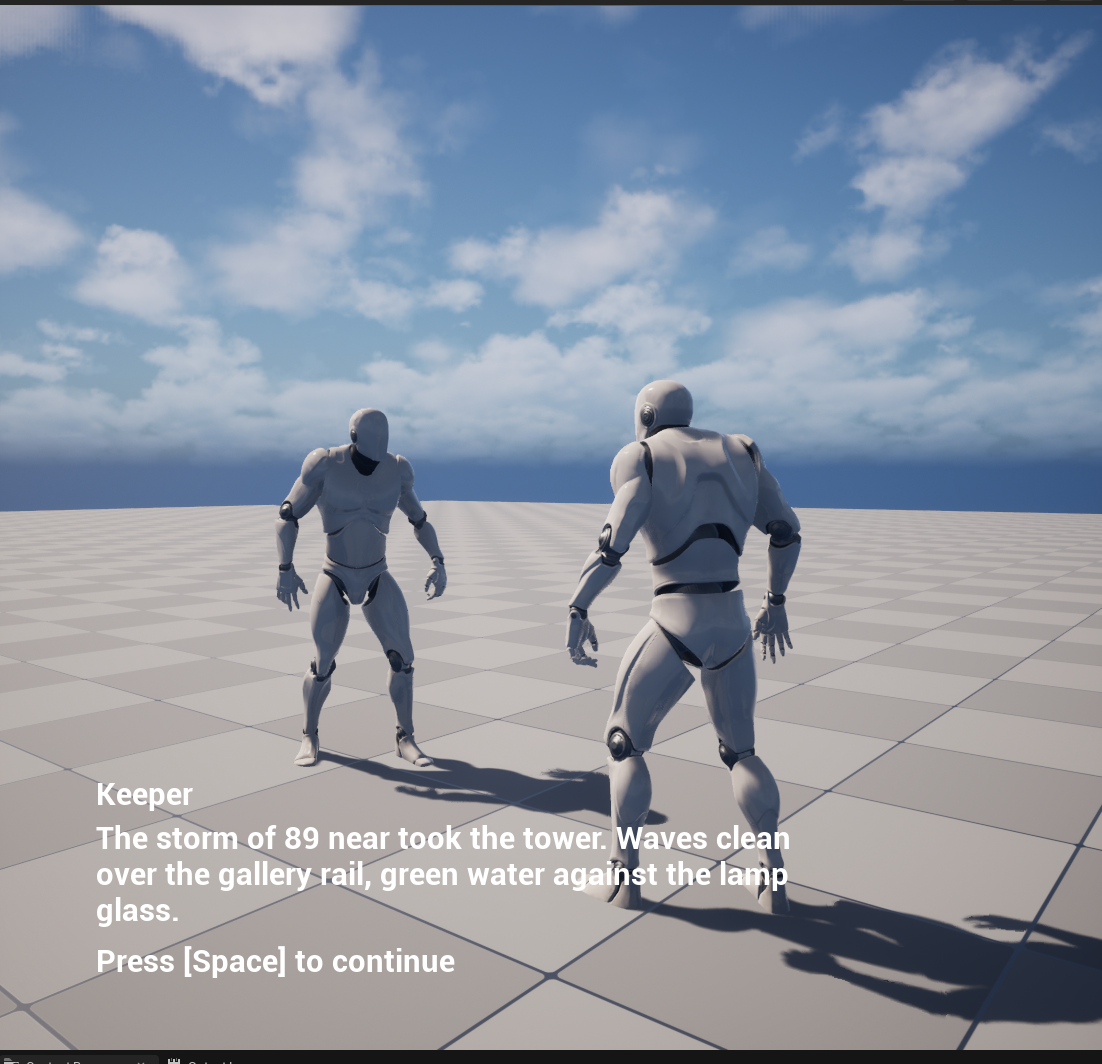
Two details to check for in your own build:
- Blend-back restores the view target captured when the beat began, not a hard-coded player camera. On the storm line the captured target is the greeting camera, so the release returns to the framing the conversation was already using, and camera beats nest correctly.
- The class resolves the player through the player controller, not through the dialogue host, so it stacks onto any Logic Driver state in any machine, dialogue or not.
For the agent: the calls behind the camera
blueprint.* creates BP_CameraBeat as an SMStateInstance subclass and wires OnStateBegin (capture GetViewTarget, resolve GetAllActorsWithTag(CameraTag), SetViewTargetWithBlend with BlendTime) and OnStateEnd (branch on BlendBackOnEnd, blend back to the captured target). mesh.spawn_actor places the two CameraActors and tags them. On the Logic Driver side it is two calls per use: ld.add_state_stack puts the class on the state, and ld.set_node_property with stack_index: 0 writes that entry's tag, duration, and flag.
The generic-surface limits an agent meets on this path are listed under Known gaps on the Monolith surface.
The animation beat
Every beat so far advances on the player's input, which is the rule a dialogue system should follow. The animation beat is the one justified exception: a character plays a gesture, and the beat lasts exactly as long as the animation does. The montage itself releases the beat, not a timer guessing at its length. The prompt:
Add an animation beat to the storm branch:
- When the player picks the storm at the hub, before the keeper's first storm-tale line, a character in the room plays a short gesture animation. The conversation holds on that beat until the gesture actually finishes, not a fixed delay and not player input; the beat lasts exactly as long as the animation does, whatever its length. Then the storm tale plays and advances on player input as before.
- Place a skeletal character in the level (tagged for runtime lookup) set up so montages actually play on it; use skeletal mesh and animation assets that already exist in the project, and author the gesture montage from an existing animation clip on the matching skeleton.
- Build the pieces as reusable classes in
/Game/DialogueSystem/Cinematics: an animation beat state class (per-node data: the target actor's tag, the montage to play, a play rate) and a "gesture finished" transition class that releases the beat the moment the montage stops. Any future conversation should be able to drop these on any tagged character.- The release transition must not fire before the beat has started its montage, because a transition can be evaluated before the state's begin logic runs. If the beat began and could not play a montage at all (no character found, no anim instance), release rather than hold the conversation forever.
- The animation beat is a real dialogue beat: keep the widget alive during it rather than stale or empty.
Before verifying in play-in-editor, confirm the authored montage's play length is a real nonzero duration. Then verify the beat holds while the montage plays, releases on its own when it ends, and the rest of the conversation still works.
What the animation prompt produces
The animation beat is a stacked class too, mirroring the camera. The new StormGesture state is an ordinary dialogue line, and the widget shows a stage direction while the character moves. BP_AnimationBeat is stacked on it, carrying the tag, the montage, and a play rate. The edge out of it is BP_Transition_GestureFinished, which finds the stacked beat on the state behind it and fires the moment the montage is no longer playing. The scene gains a tagged mannequin wired to an animation blueprint with a montage slot, and the gesture is a montage authored from an existing clip.
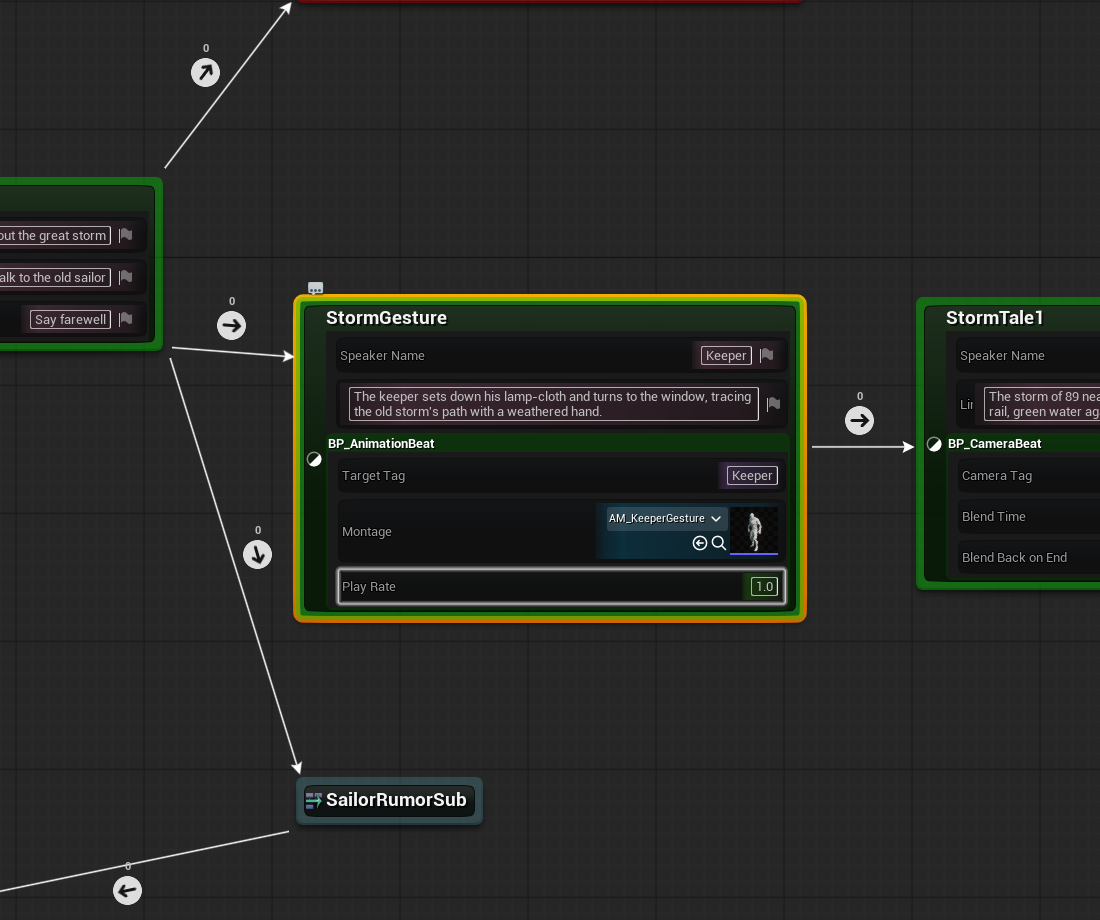
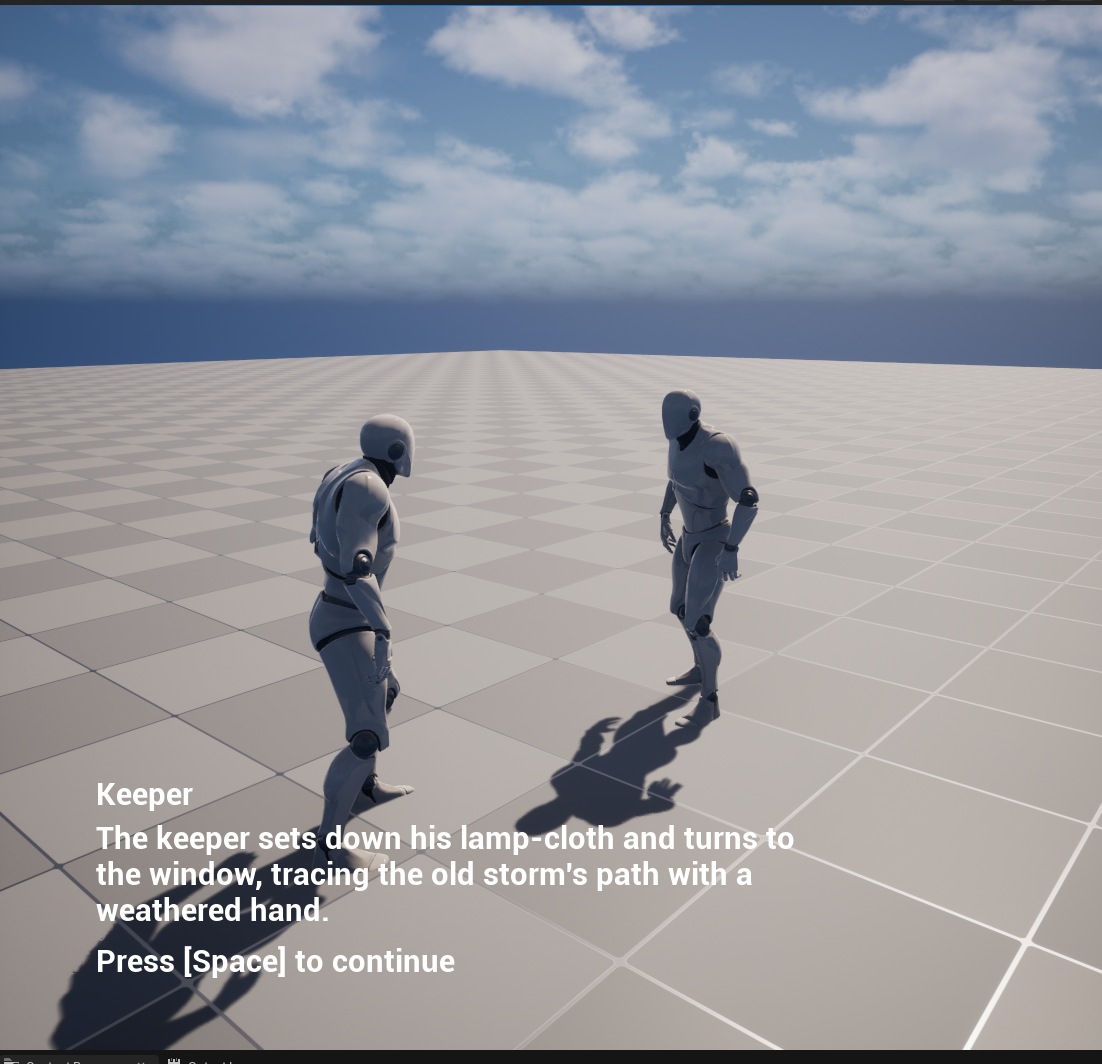
The continue hint still reads "Press [Space]" during the gesture because StormGesture is an ordinary line state; the beat ignores the press. The line state that follows discards that pending press when it begins, so it cannot skip the storm tale. That behavior is part of the system prompt.
Three details to check for in your own build:
- The release transition reads the stack, and fails open.
BP_Transition_GestureFinishedreaches the beat withGetPreviousStateInstanceand a stack lookup by class, then asks it, through a small accessor function, whether the gesture is done. If the chain is missing (no stacked beat, wrong state), or the beat ran but found no character to play on, the result is done. A missing prop can never deadlock a conversation. - Fail-open needs an arming flag. A transition can be evaluated before the state's begin logic has run, and at that moment the beat has no anim instance yet. A check that reads "cannot find the montage" as finished releases instantly. The accessor holds while the beat has not yet begun, and fails open only once begin genuinely could not start the gesture. If you build your own held beats, this evaluation-order race is the bug you are most likely to write first.
- "The moment the montage stops" is blend-aware. A montage reports stopped when its blend-out begins, not when its last frame lands. The release therefore leads the visual end by the blend-out time, and the cut into the next line is clean.
For the agent: the calls behind the animation beat
The montage is the step to watch. The animation.* surface can create a montage and add a segment, but nothing on it recomputes the composed length, so the result reports a duration of zero and plays as an instant no-op. The working path is a short editor-python snippet using AnimMontageFactory with a source_animation, which produces the real play length. That is why the prompt makes you confirm the length before running. The character setup is python too (spawn the skeletal actor, set the mesh, set the animation blueprint, tag it); a bare skeletal actor has no anim instance and Montage_Play silently does nothing.
The classes are blueprint.* work: BP_AnimationBeat resolves its target by tag exactly as the camera does, caches the anim instance, and calls Montage_Play with the per-node rate; BP_Transition_GestureFinished is GetPreviousStateInstance, a cast to SMStateInstance (the previous-state getter returns the _Base type, so the cast is required before a stack lookup), GetStateInStackByClass, the accessor, then NOT into the result. On the Logic Driver side, ld.add_state inserts StormGesture, ld.remove_node and two ld.add_transition calls rewire the branch, ld.add_state_stack and ld.set_node_property with stack_index: 0 configure the beat, ld.compile finishes.
The generic-surface limits an agent meets on this path are listed under Known gaps on the Monolith surface.
Why Blueprint node classes, not C++
Every class here is a Blueprint because the whole point of Assist is that an agent authored it from a prompt, over the operation surface, with no build step. A camera cut needs nothing a Blueprint node class cannot express. The moment a feature genuinely needs a C++-only capability, C++ is right; the first-party LogicDriver-Dialogue plugin is that reference, with USMDialogueNode and friends written in C++ for a shipping vertical. That is a different goal from proving an agent can build the vertical on top of generic Logic Driver, which is what this example is.
Monolith-primary authoring, and the official transport
The Logic Driver graph work goes through the ld.* operations, which run on both the Monolith bridge and the official UE 5.8 toolset. The pieces around them, the node classes and widget (blueprint.*, ui.*), the montage (editor python), and the placed cameras and character (mesh.*, editor.*), are Monolith-only. On the official transport, provide those by hand (or from a map template) and drive the Logic Driver work with ld.*.
Related
- A Dialogue System & the Lighthouse: the system and conversation these cinematics ride on.
- Authoring with an AI Agent: the conventions to paste into your agent so the first pass comes out clean.
- What You Can Author: the operation surface behind these prompts, and where the
ld.*line falls. - Troubleshooting: symptom-first fixes when a graph does not run or an operation fails.