Graph Generation  

Graph Generation is a C++ interface for building and editing state machine blueprints without the graph editor. It mirrors what a user does by hand, placing states and transitions, exposing and wiring variables, building stacks, nesting and collapsing state machines, so the same operations can be driven from tooling, importers, or procedural generators.
The interface is ISMGraphGeneration. It works alongside ISMAssetManager, which creates and compiles the blueprint assets the generation calls operate on. Both are reached through ISMAssetToolsModule.
Editor only
Graph Generation lives in the editor-only SMAssetTools module and manipulates blueprint graphs. Call it from an editor or uncooked module (editor utilities, commandlets, asset tooling). It is not available in a packaged runtime.
Manual authoring is still the norm
Most state machines are best authored by hand in the graph editor. Reach for Graph Generation when you need to produce or modify assets programmatically, such as importing from an external format, generating variants in bulk, or building authoring tools on top of Logic Driver.
Build.cs setup
Add the asset tools module to your editor module. SMAssetTools publicly depends on SMSystem and SMSystemEditor, so the state, transition, and graph-node types come along with it. UnrealEd provides FKismetEditorUtilities for compiling, and BlueprintGraph provides FEdGraphPinType if you author node-class variables.
PrivateDependencyModuleNames.AddRange(new string[]
{
    "SMSystem",
    "SMSystemEditor",
    "SMAssetTools",
    "UnrealEd",        // FKismetEditorUtilities::CompileBlueprint
    "BlueprintGraph",  // FEdGraphPinType, for node-class variables
});
Accessing the interfaces
Both interfaces are returned as shared pointers from the module. Load the module once and hold the interfaces for the duration of your operation.
#include "ISMAssetToolsModule.h"
#include "ISMAssetManager.h"
#include "ISMGraphGeneration.h"

ISMAssetToolsModule& AssetTools = ISMAssetToolsModule::Get();
TSharedPtr<ISMAssetManager> AssetManager = AssetTools.GetAssetManagerInterface();
TSharedPtr<ISMGraphGeneration> GraphGen = AssetTools.GetGraphGenerationInterface();
Example node classes
The walkthrough below builds an enemy GuardAI (Idle → Patrol → Chase) using these two example node classes. USMExampleState exposes a plain property, an array, and an input/output variable pair; USMExampleTransition drives its evaluation from an exposed bool.
// State class: a plain property, an array, and an input/output variable pair.
UCLASS(Blueprintable, BlueprintType)
class USMExampleState : public USMStateInstance
{
    GENERATED_BODY()
public:
    UPROPERTY(BlueprintReadWrite, Category = "Example")
    FString DisplayLabel;

    UPROPERTY(BlueprintReadWrite, Category = "Example")
    TArray<FString> Waypoints;

    /** Output variable: written when the state ends, readable downstream. */
    UPROPERTY(BlueprintReadWrite, Category = "Example", meta = (LD_PropertyDirection = "Output"))
    int32 EnemiesSpotted = 0;

    /** Input variable: receives a value wired from an upstream output. */
    UPROPERTY(BlueprintReadWrite, Category = "Example", meta = (LD_PropertyDirection = "Input"))
    int32 InitialTargetCount = 0;
};

// Transition class: an exposed bool drives the evaluation result.
UCLASS(Blueprintable, BlueprintType)
class USMExampleTransition : public USMTransitionInstance
{
    GENERATED_BODY()
public:
    UPROPERTY(BlueprintReadWrite, Category = "Example")
    bool bCanAdvance = true;

protected:
    virtual bool CanEnterTransition_Implementation() const override { return bCanAdvance; }
};
Walkthrough: build a state machine from scratch
This example creates a new state machine asset, places three states (using USMExampleState) wired in a line from the entry point, adds transitions, and compiles. Each step links to the API call it uses.
1. Create the blueprint asset
CreateStateMachineBlueprint mints a new USMBlueprint. The name is adjusted automatically on collision.
#include "Blueprints/SMBlueprint.h"

ISMAssetManager::FCreateStateMachineBlueprintArgs BlueprintArgs;
BlueprintArgs.Name = TEXT("GuardAI");
BlueprintArgs.Path = TEXT("/Game/StateMachines");
// BlueprintArgs.ParentClass = UMyStateMachineInstance::StaticClass(); // optional

USMBlueprint* NewBP = AssetManager->CreateStateMachineBlueprint(BlueprintArgs);
if (!NewBP)
{
    return;
}
2. Create the entry state
CreateStateNode places a state. Set bIsEntryState to wire it to the graph's entry point so it becomes the initial state. The templated overload casts the result for you.
#include "Graph/Nodes/SMGraphNode_StateNode.h"

ISMGraphGeneration::FCreateStateNodeArgs StateArgs;
StateArgs.StateInstanceClass = USMExampleState::StaticClass();   // omit to default to USMStateInstance
StateArgs.StateName = TEXT("Idle");
StateArgs.bIsEntryState = true;            // wire to the entry point
StateArgs.NodePosition = FVector2D(128.f, 0.f);

USMGraphNode_StateNode* IdleState =
    GraphGen->CreateStateNode<USMGraphNode_StateNode>(NewBP, StateArgs);
Node layout
States flow rightward from the entry node. Advance NodePosition.X for each state so the generated graph reads left to right, the same convention the editor uses.
3. Create more states and wire transitions
Create the remaining states (they reuse StateArgs, so they keep USMExampleState), then connect them with CreateTransitionEdge. Assign a TransitionInstanceClass to evaluate the transition through a node class, or set bDefaultToTrue for an always-true transition (valid only when no transition class is assigned).
Transitions need a condition to fire
A transition with no condition and no transition class evaluates to false, so the state machine would never leave the source state. Set bDefaultToTrue for an always-true transition, assign a TransitionInstanceClass, or author a condition in the transition graph. This walkthrough uses bDefaultToTrue so the machine advances on its own.
#include "Graph/Nodes/SMGraphNode_TransitionEdge.h"

// Patrol
StateArgs.StateName = TEXT("Patrol");
StateArgs.bIsEntryState = false;
StateArgs.NodePosition = FVector2D(384.f, 0.f);
USMGraphNode_StateNode* PatrolState =
    GraphGen->CreateStateNode<USMGraphNode_StateNode>(NewBP, StateArgs);

// Chase
StateArgs.StateName = TEXT("Chase");
StateArgs.NodePosition = FVector2D(640.f, 0.f);
USMGraphNode_StateNode* ChaseState =
    GraphGen->CreateStateNode<USMGraphNode_StateNode>(NewBP, StateArgs);

// Idle -> Patrol, evaluated by the transition class (its bCanAdvance).
ISMGraphGeneration::FCreateTransitionEdgeArgs TransitionArgs;
TransitionArgs.TransitionInstanceClass = USMExampleTransition::StaticClass();
TransitionArgs.FromStateNode = IdleState;
TransitionArgs.ToStateNode = PatrolState;
GraphGen->CreateTransitionEdge(NewBP, TransitionArgs);

// Patrol -> Chase, always passes (no transition class, so bDefaultToTrue applies).
ISMGraphGeneration::FCreateTransitionEdgeArgs ChaseArgs;
ChaseArgs.FromStateNode = PatrolState;
ChaseArgs.ToStateNode = ChaseState;
ChaseArgs.bDefaultToTrue = true;
GraphGen->CreateTransitionEdge(NewBP, ChaseArgs);
Wiring a chain in one step
Instead of creating each state standalone and adding a separate transition, set FCreateStateNodeArgs::FromPin to the previous state's output pin. The new state is wired with a transition from that state automatically, the same as dragging a new state off an existing one in the editor.
4. Compile
Building the graph leaves the blueprint dirty. Compile it so the generated class reflects the new graph. Save it as you would any asset (for example UEditorAssetLibrary::SaveLoadedAsset, or the editor's Save All).
Batch then compile
Compiling is the expensive step. When generating many nodes or assets, do all the graph edits first and compile once at the end rather than after each change.
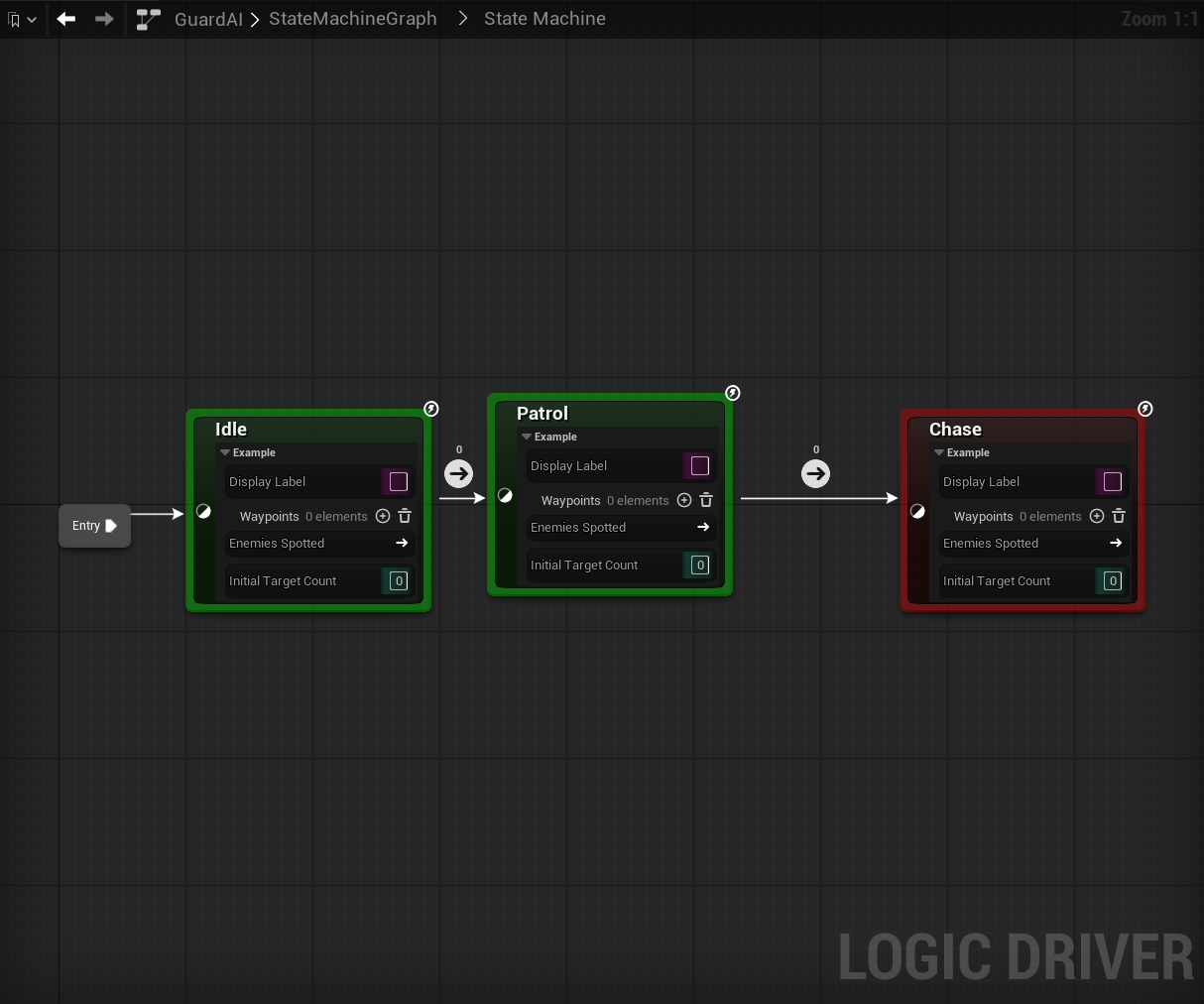
Full example
void BuildGuardAI()
{
    ISMAssetToolsModule& AssetTools = ISMAssetToolsModule::Get();
    TSharedPtr<ISMAssetManager> AssetManager = AssetTools.GetAssetManagerInterface();
    TSharedPtr<ISMGraphGeneration> GraphGen = AssetTools.GetGraphGenerationInterface();

    ISMAssetManager::FCreateStateMachineBlueprintArgs BlueprintArgs;
    BlueprintArgs.Name = TEXT("GuardAI");
    BlueprintArgs.Path = TEXT("/Game/StateMachines");
    USMBlueprint* NewBP = AssetManager->CreateStateMachineBlueprint(BlueprintArgs);
    if (!NewBP)
    {
        return;
    }

    auto MakeState = [&](const FString& Name, float X, bool bEntry)
    {
        ISMGraphGeneration::FCreateStateNodeArgs Args;
        Args.StateInstanceClass = USMExampleState::StaticClass();
        Args.StateName = Name;
        Args.bIsEntryState = bEntry;
        Args.NodePosition = FVector2D(X, 0.f);
        return GraphGen->CreateStateNode<USMGraphNode_StateNode>(NewBP, Args);
    };

    USMGraphNode_StateNode* Idle = MakeState(TEXT("Idle"), 128.f, true);
    USMGraphNode_StateNode* Patrol = MakeState(TEXT("Patrol"), 384.f, false);
    USMGraphNode_StateNode* Chase = MakeState(TEXT("Chase"), 640.f, false);

    // Idle -> Patrol is evaluated by the transition class.
    ISMGraphGeneration::FCreateTransitionEdgeArgs IdleToPatrol;
    IdleToPatrol.TransitionInstanceClass = USMExampleTransition::StaticClass();
    IdleToPatrol.FromStateNode = Idle;
    IdleToPatrol.ToStateNode = Patrol;
    GraphGen->CreateTransitionEdge(NewBP, IdleToPatrol);

    // Patrol -> Chase always passes.
    ISMGraphGeneration::FCreateTransitionEdgeArgs PatrolToChase;
    PatrolToChase.FromStateNode = Patrol;
    PatrolToChase.ToStateNode = Chase;
    PatrolToChase.bDefaultToTrue = true;
    GraphGen->CreateTransitionEdge(NewBP, PatrolToChase);

    FKismetEditorUtilities::CompileBlueprint(NewBP);
}
Setting exposed property values
SetNodePropertyValue writes a default value onto a node's exposed property. It works for public and non-public properties as well as custom graph properties such as Text Graphs. Values are passed as Unreal property-text strings. Use GET_MEMBER_NAME_CHECKED so the name tracks renames.
Using USMExampleState from Example node classes, set a scalar value:
ISMGraphGeneration::FSetNodePropertyArgs SetArgs;
SetArgs.PropertyName = GET_MEMBER_NAME_CHECKED(USMExampleState, DisplayLabel);
SetArgs.PropertyDefaultValue = TEXT("Watchtower");
GraphGen->SetNodePropertyValue(PatrolState, SetArgs);
Arrays
EArrayChangeType selects the structural operation. Add or insert grows the array, then set an element by index. The same enum supports RemoveElement, Clear, DuplicateElement, and MoveElement.
// Append an element.
ISMGraphGeneration::FSetNodePropertyArgs AddArgs;
AddArgs.PropertyName = GET_MEMBER_NAME_CHECKED(USMExampleState, Waypoints);
AddArgs.ArrayChangeType = ISMGraphGeneration::EArrayChangeType::AddElement;
GraphGen->SetNodePropertyValue(PatrolState, AddArgs);

// Set element 0.
ISMGraphGeneration::FSetNodePropertyArgs ElemArgs;
ElemArgs.PropertyName = GET_MEMBER_NAME_CHECKED(USMExampleState, Waypoints);
ElemArgs.PropertyIndex = 0;
ElemArgs.PropertyDefaultValue = TEXT("North");
GraphGen->SetNodePropertyValue(PatrolState, ElemArgs);
Nested struct members and arrays
FSetNodePropertyArgs::SubPath addresses a member inside a struct property, or an element of a nested array, using MemberA.MemberB[i].MemberC syntax. For a scalar write the path ends at the leaf; for a structural array mutation the path ends at the array itself and PropertyIndex / TargetIndex carry the indices.
Split struct parents first
Writing through a SubPath requires every struct parent in the path to be split into sub-pins (the same Split Struct Pin action available in the editor; see Struct Properties). Writing to an unsplit parent is rejected, because the value would land on a collapsed parent literal and get wiped on the next construction-script tick. Pass the optional OutError argument of SetNodePropertyValue to receive the reason when a SubPath fails to resolve, such as an unknown member or an unsplit parent. Other failures only log and leave it empty.
// Write propA[0].propB[1].propC (scalar leaf).
ISMGraphGeneration::FSetNodePropertyArgs DeepArgs;
DeepArgs.PropertyName = TEXT("propA");
DeepArgs.PropertyIndex = 0;
DeepArgs.SubPath = TEXT("propB[1].propC");
DeepArgs.PropertyDefaultValue = TEXT("42");
GraphGen->SetNodePropertyValue(StateNode, DeepArgs);
Resetting a property
ResetNodePropertyValue restores a property (or array element) to its class default, mirroring the editor's right-click Reset Pin to Default Value.
ISMGraphGeneration::FResetNodePropertyArgs ResetArgs;
ResetArgs.PropertyName = GET_MEMBER_NAME_CHECKED(USMExampleState, DisplayLabel);
GraphGen->ResetNodePropertyValue(PatrolState, ResetArgs);
Authoring a property graph directly
For logic beyond a default value, FindPropertyGraph resolves the USMPropertyGraph behind an exposed variable so you can wire K2 nodes against its result pin. The result carries the graph, the property K2 node, and the wire-into pin.
ISMGraphGeneration::FFindPropertyGraphArgs FindArgs;
FindArgs.VariableName = GET_MEMBER_NAME_CHECKED(USMExampleState, DisplayLabel);

ISMGraphGeneration::FFindPropertyGraphResult Result;
FString Error;
if (GraphGen->FindPropertyGraph(PatrolState, FindArgs, Result, &Error))
{
    // Result.Graph, Result.ResultNode, Result.ResultPin are now valid.
}
When wiring a Text Graph durably, enable graph-edit mode on its property graph first with SetPropertyGraphEditMode; the text graph compile pipeline only honors wired changes in edit mode.
Output variables
ConnectNodeVariableOutput wires an output variable to a destination, either another node's input variable in the same state machine, or a variable on the owning state machine blueprint. Endpoints are described with FNodeVariableEndpoint; StackIndex of INDEX_NONE addresses the primary node template.
ISMGraphGeneration::FConnectNodeVariableOutputArgs ConnectArgs;
ConnectArgs.FromOutputVariable.StateNode = PatrolState;
ConnectArgs.FromOutputVariable.VariableName =
    GET_MEMBER_NAME_CHECKED(USMExampleState, EnemiesSpotted);     // must be Output or Both

// Destination A: another node's input variable.
ISMGraphGeneration::FNodeVariableEndpoint ToInput;
ToInput.StateNode = ChaseState;
ToInput.VariableName =
    GET_MEMBER_NAME_CHECKED(USMExampleState, InitialTargetCount); // must be Input or Both
ConnectArgs.ToInputVariable = ToInput;

// Destination B (mutually exclusive): a variable on the owning blueprint.
// ConnectArgs.ToOwningBlueprintVariable = TEXT("LastScore");

GraphGen->ConnectNodeVariableOutput(NewBP, ConnectArgs);
In the GuardAI example this wires Patrol's EnemiesSpotted output to Chase's InitialTargetCount input, so each state shows its exposed variables and the output feeds the downstream input:
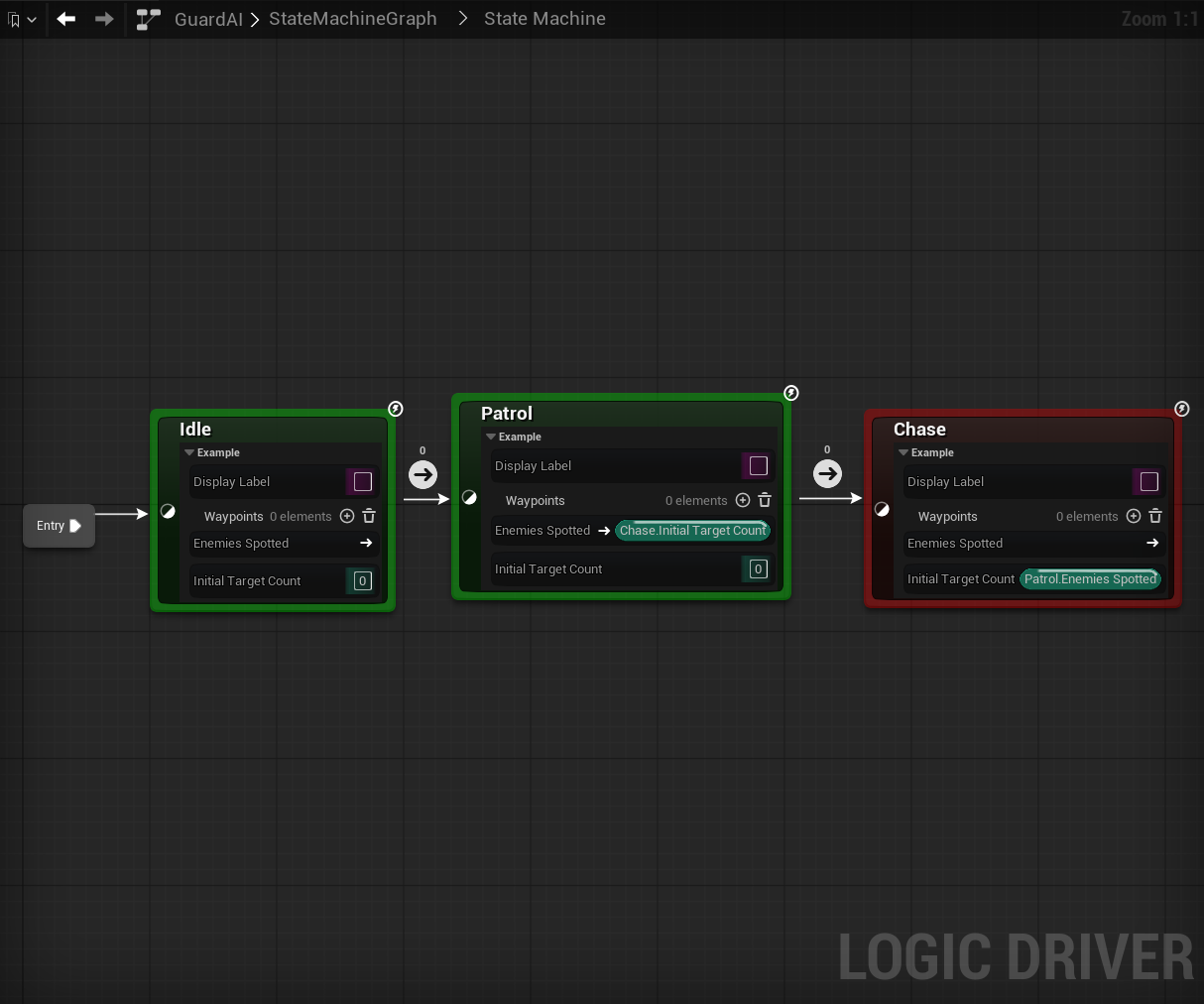
Exactly one destination must be set. The call is idempotent (re-establishing an existing wire returns true without duplicating nodes). DisconnectNodeVariableOutput breaks a previously-established wire using the same args.
State and transition stacks
Add additional node-class templates to a state's state stack with CreateStateStackInstance, or to a transition's transition stack with CreateTransitionStackInstance. Leave the index at INDEX_NONE to append.
ISMGraphGeneration::FCreateStateStackArgs StackArgs;
StackArgs.StateStackInstanceClass = UMyOtherStateInstance::StaticClass();
USMStateInstance* StackInstance =
    GraphGen->CreateStateStackInstance(PatrolState, StackArgs);
To address a specific stack entry in a later property write, set FSetNodePropertyArgs::NodeInstance to the returned stack instance.
Nested state machines and references
Pass a state-machine graph-node class to CreateStateNode to place an inline nested state machine or a reference. FCreateStateNodeArgs::StateMachineReferenceConfig configures a reference at creation, and ConfigureStateMachineReference reconfigures one afterward (swap the referenced blueprint, toggle the intermediate graph). See State Machine References.
#include "Graph/Nodes/SMGraphNode_StateMachineStateNode.h"

ISMGraphGeneration::FCreateStateNodeArgs RefArgs;
RefArgs.GraphNodeClass = USMGraphNode_StateMachineStateNode::StaticClass();
RefArgs.StateMachineReferenceConfig.ReferencedBlueprint = ExistingReferenceBP;
RefArgs.NodePosition = FVector2D(384.f, 0.f);
USMGraphNode_StateMachineStateNode* RefNode =
    GraphGen->CreateStateNode<USMGraphNode_StateMachineStateNode>(NewBP, RefArgs);
Local graph logic nodes
State and transition graphs can be seeded with Logic Driver's bound read and write nodes.
CreateLocalGraphReadNode spawns a read node (selected by ELocalGraphReadNodeType) into a state's OnStateBegin / OnStateUpdate / OnStateEnd graph or a transition's CanEnterTransition graph. Each type has its own compatibility rules; for example CanEvaluate is transition-only.
UEdGraph* TargetGraph = Transition->GetBoundGraph();

ISMGraphGeneration::FCreateLocalGraphReadNodeArgs ReadArgs;
ReadArgs.NodeType = ISMGraphGeneration::ELocalGraphReadNodeType::TimeInState;
ReadArgs.TargetGraph = TargetGraph;
ReadArgs.NodePosition = FVector2D(100.f, 50.f);
UEdGraphNode* ReadNode = GraphGen->CreateLocalGraphReadNode(NewBP, ReadArgs);
CreateLocalGraphWriteNode spawns a write node (ELocalGraphWriteNodeType, such as CanEvaluate) into a transition or conduit graph, optionally seeding its boolean default.
GetCompatibleLocalGraphNodeTypes reports which read and write node kinds a given bound graph accepts, without spawning anything, so you can discover the valid ELocalGraphReadNodeType / ELocalGraphWriteNodeType values for a graph before calling the create functions above.
CreateLocalGraphEventNode places a lifecycle event-entry node (selected by ELocalGraphEventNodeType) into a state, transition, conduit, or intermediate graph. The type covers nine kinds — initialize, shutdown, state update, state end, transition entered, transition pre-evaluate, transition post-evaluate, and root state machine start and stop — and each is placed only into a graph that accepts it, honoring the per-kind singleton limit. OnStateUpdate and OnStateEnd are placed in every state graph when it is created and cannot be deleted, so a request to spawn either one is rejected and the call returns null.
GetCompatibleLocalGraphEventNodeTypes reports which event-entry kinds a given bound graph accepts, so you can query the valid ELocalGraphEventNodeType values before spawning.
Transition events
ConfigureTransitionEvent binds, rebinds, or clears the delegate a transition listens to, and sets its update-trigger flags. Only the fields you set in FConfigureTransitionEventArgs are applied, matching a Details-panel edit. To set both a delegate owner and a property name in one call, supply both, as an owner change cascades a reset of the name.
ISMGraphGeneration::FConfigureTransitionEventArgs EventArgs;
EventArgs.DelegateOwnerInstance = ESMDelegateOwner::SMDO_Context;
EventArgs.DelegateOwnerClass = AMyActor::StaticClass();
EventArgs.DelegatePropertyName = TEXT("OnSomethingHappened");
GraphGen->ConfigureTransitionEvent(Transition, EventArgs);
Node-class variables
CreateNodeClassVariable adds a blueprint variable to a node-class blueprint (a USMNodeInstance subclass) and stamps its direction, hidden, and read-only flags, the one-shot equivalent of the Logic Driver Variable details panel. ConfigureNodeClassVariable updates those flags on an existing variable.
#include "EdGraphSchema_K2.h"

ISMGraphGeneration::FCreateNodeClassVariableArgs VarArgs;
VarArgs.VariableName = TEXT("Health");
VarArgs.VariableType.PinCategory = UEdGraphSchema_K2::PC_Int;
VarArgs.Direction = ESMGraphPropertyDirection::Output;
GraphGen->CreateNodeClassVariable(MyNodeClassBP, VarArgs);
Compile cost
When any of Direction, bHidden, or bReadOnly is set, the node-class blueprint is compiled in-call so the override can be stamped on the class default object. A plain variable add (no flags) is not compiled. Batch plain adds and compile once for best performance.
Map and Set types cannot be exposed
Map and Set variables cannot be exposed on the node, matching the editor's Variable Details panel filter (see Unsupported Containers). Setting Direction, bHidden, or bReadOnly on a Map or Set variable is rejected; omit those flags to add it as a plain, non-exposed blueprint variable.
Topology editing
These operations restructure an existing graph, mirroring the editor's right-click entries. The ones that can fail for structural reasons take an optional OutError you can surface to the user.
- RemoveNode: remove a node and break its connections.
- SetInitialState: rewire the entry to target a different state.
- CreateTransitionReroute: add a cosmetic reroute waypoint to bend a transition curve.
- CollapseNodesToStateMachine: collapse a selection into a new nested state machine, rewiring boundary transitions.
- MergeStates: merge source states' templates into a destination state's stack (cut or copy).
- ReplaceNode: replace a node in place with a different kind (
EReplaceNodeKind), preserving transitions. - ConvertStateMachineToReference: extract an inline nested state machine into its own reusable reference asset.
ISMGraphGeneration::FReplaceNodeArgs ReplaceArgs;
ReplaceArgs.Node = SomeState;
ReplaceArgs.TargetKind = ISMGraphGeneration::EReplaceNodeKind::Conduit;

FString Error;
if (USMGraphNode_Base* NewNode = GraphGen->ReplaceNode(ReplaceArgs, &Error))
{
    // SomeState was replaced with a conduit; transitions preserved.
}
API reference
| Operation | Call |
|---|---|
| Create blueprint asset | ISMAssetManager::CreateStateMachineBlueprint |
| Create state / nested SM / reference | CreateStateNode |
| Create transition | CreateTransitionEdge |
| Create transition reroute | CreateTransitionReroute |
| Set initial state | SetInitialState |
| Set property value | SetNodePropertyValue |
| Reset property value | ResetNodePropertyValue |
| Resolve property graph | FindPropertyGraph |
| Resolve root state machine graph | GetRootStateMachineGraph |
| Toggle property-graph edit mode | SetPropertyGraphEditMode |
| Connect / disconnect output variable | ConnectNodeVariableOutput / DisconnectNodeVariableOutput |
| State / transition stack | CreateStateStackInstance / CreateTransitionStackInstance |
| Configure state machine reference | ConfigureStateMachineReference |
| Local graph read / write node | CreateLocalGraphReadNode / CreateLocalGraphWriteNode |
| Compatible local graph node types | GetCompatibleLocalGraphNodeTypes |
| Local graph event node | CreateLocalGraphEventNode |
| Compatible local graph event node types | GetCompatibleLocalGraphEventNodeTypes |
| Configure transition event | ConfigureTransitionEvent |
| Node-class variable create / configure | CreateNodeClassVariable / ConfigureNodeClassVariable |
| Remove node | RemoveNode |
| Collapse to nested SM | CollapseNodesToStateMachine |
| Merge states | MergeStates |
| Replace node | ReplaceNode |
| Convert to reference | ConvertStateMachineToReference |
See Using with C++ for general native usage of Logic Driver. For agent-driven or MCP-driven authoring over this same capability, see Logic Driver Assist.