Specifiers  

Logic Driver has special handling for certain engine provided specifiers on nodes. There are also some new specifiers for Logic Driver. Just because a specifier is not listed does not mean there isn't still some level of support.
Node Class Specifiers
Specifiers set when defining a node class in Logic Driver.
Abstract
These nodes won't be selectable in either the context menu or node class drop downs. Usage is consistent with the engine and nodes will never be instantiated.
NotPlaceable
Prevents node classes from displaying in the state machine graph context menu.
Class Metadata Specifiers
Category="Name"
The category that will show up in the context menu when placing a state.
This is overridden by setting NodeDescription.Category.
DisplayName="Name"
The name that will display in the context menu when choosing a state and will be the default name when placing the state. It is also used in some places for transitions.
This is overridden by setting NodeDescription.Name.
NoLogicDriverExport
Prevents built-in plugin exporters from exporting this node class.
Node Property Specifiers
Specifiers set on properties within a node class.
BlueprintReadWrite
Exposes the property as writable on the node when instanced in the state machine graph.
BlueprintReadOnly
Exposes the property as read-only on the node when instanced in the state machine graph. This status cannot be changed through editor construction scripts.
LD_PropertyDirection="Direction"
Specifies the direction of an exposed property on a state. Accepts "Input", "Output", or "Both". To configure both input and output, you may also use a comma-separated value: "Input,Output".
See Output Variables for more information.
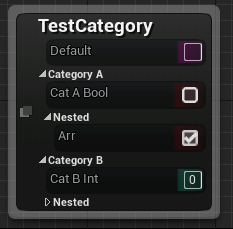
Category="Name"
Groups the property into a category displayed on the state. Note that the "Default" category always displays first on states. Nested categories can be defined as "Category A | Nested".
Instanced
Instanced is not supported with exposed properties, but can be used from the details panel if following the Instanced Objects Guide.
Property Metadata Specifiers
AdvancedDisplay
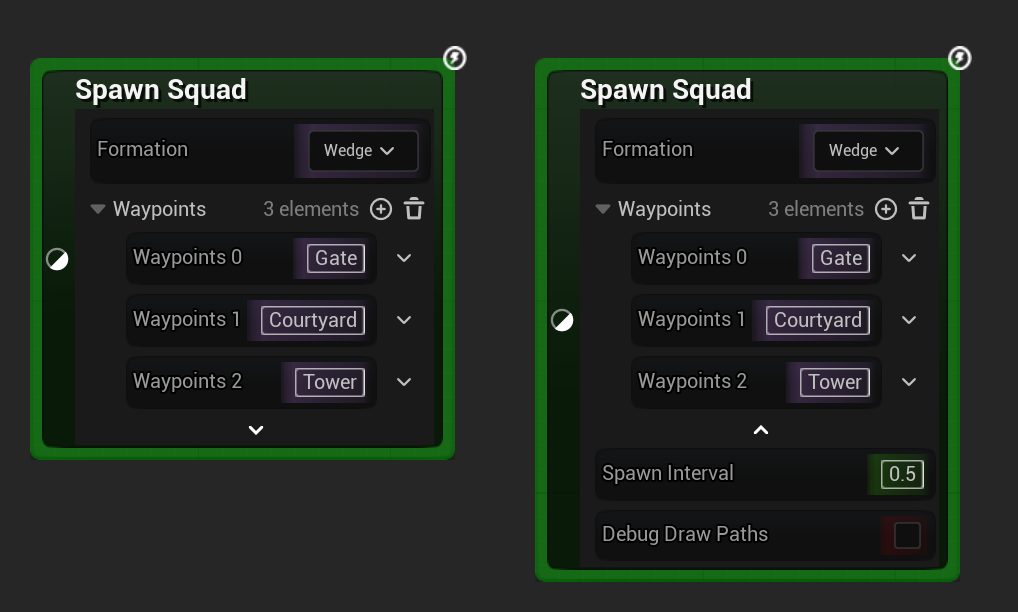
Properties marked with the engine AdvancedDisplay specifier are collapsed behind an expandable chevron in the node's property tree view, mirroring the Advanced section in the details panel. Expand the category chevron to reveal and edit them. Default values and wiring behave the same as standard exposed properties.
DisplayAfter="OtherProperty"
Displays the variable on the node after the listed property. Note that this does not support displaying after blueprint child variables.
DisplayPriority="Priority"
The priority to the display the variable on the node.
DisplayThumbnail="true/false"
Show or hide a thumbnail on exposed object properties. This is overridden if set on the property's WidgetInfo and requires the project editor setting OverrideObjectPins enabled.
EditCondition="Expression"
Gates an exposed node variable by the engine's EditCondition metadata, evaluated against the node's own values and applied directly on the state node (not just in the details panel). When the expression is false the variable is set read only on the node; pair it with EditConditionHides to hide it instead. When true, the variable stays editable and visible.
The expression matches the engine's details-panel semantics: unary !, logical && / ||, equality and relational comparisons, arithmetic, parenthesized grouping, and bool, numeric, or enum operands, plus no-argument bool UFUNCTION conditions. An expression that cannot be parsed or resolved to a bool is treated as met, so a malformed condition never hides or locks a variable.
A construction script or an authored Exposed Property Override that already set a variable's read only / hidden state wins per variable; the EditCondition result only applies where neither did. See Read Only Variables and Hidden Variables.
EditConditionHides
Modifies EditCondition: when the condition is false the variable is hidden on the node instead of shown read only. Has no effect without an accompanying EditCondition. Unlike HideOnNode, the hide is conditional and re-evaluates as the gating values change.
GetOptions="FunctionName"
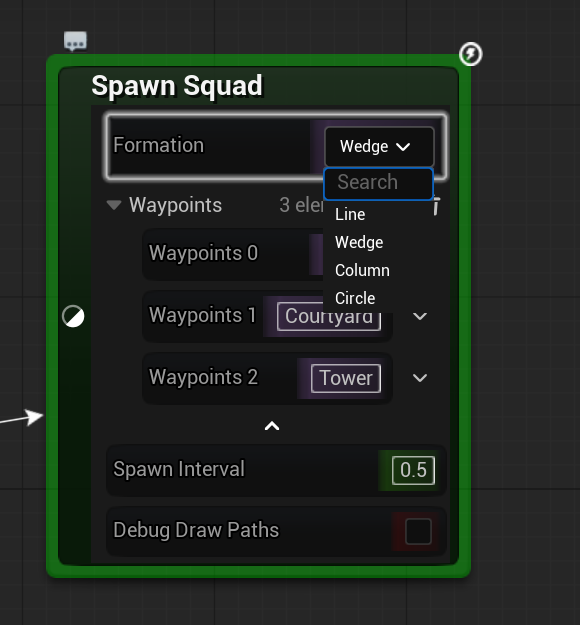
Restricts a String or Name input property to a fixed set of values, shown as a dropdown on the node instead of a free-text field. Consistent with the engine's GetOptions meta.
The named function supplies the available options and may be either a member function on the node class or a fully-qualified static function (for example Engine.KismetSystemLibrary.GetCollisionProfileNames), returning TArray<FString> or TArray<FName>. Arrays of strings or names are also supported, with each element presenting its own dropdown.
HideOnNode
Prevents an otherwise public property from being displayed on the node. A property graph will not be created in this case and cannot be changed by editor construction scripts. This specifier existed before the ability to toggle the hidden state of properties on nodes was introduced and may be renamed in the future.
LogicDriverExport
Ensure this property is exported through the plugin's built-in exporters. Overridden by NoLogicDriverExport.
NoLogicDriverExport
Prevent this property from being exported by the plugin's built-in exporters.
ShowOnlyInnerProperties
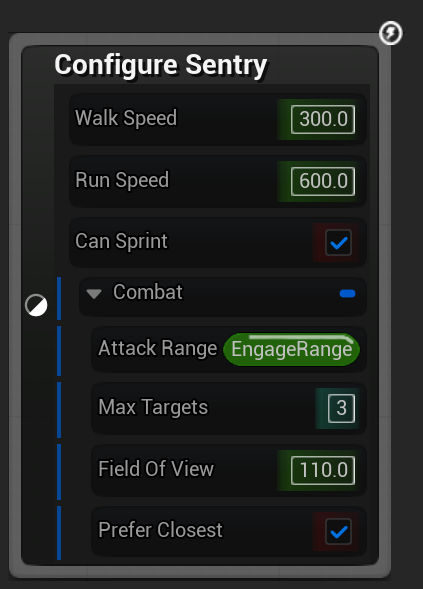
For struct properties, forces the property to always render as its inner sub-pins with no struct header row, exposing only the inner members. The property cannot be split or recombined by hand, so the right-click Split Struct Pin and Recombine Struct Pin entries are not shown for it. See Struct Properties for the general split-struct behavior.
Behavior depends on where the meta is declared:
- On a top-level UPROPERTY in a state class: the property is always shown as its inner members; the user cannot collapse it back to a single struct row. Members render at the top level of the exposed-property tree at the same indent as other state-class variables.
- On a UPROPERTY inside a USTRUCT (a nested struct field): when the containing struct is split, the nested field's header row is omitted and its members render at the parent struct's indent rather than as a separately-splittable group. The outer struct still shows its own header unless it also uses this specifier.
This is a UPROPERTY meta keyword and is typically declared in C++. The node below exposes both cases: Movement carries the meta at the top level, and Combat is a normal struct whose nested Targeting member carries it.
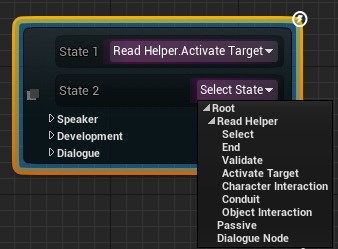
UseLogicDriverStatePicker
Compatible with FString type properties. Displays a UI for selecting a state from within the current state machine.
The string path generated is compatible with GetStateInstanceByQualifiedName and SwitchActiveStateByQualifiedName.
NodeBaseOnly [Internal Use]
Only display the property in the details panel when editing class defaults, not when editing node templates in a state machine graph. EditDefaultsOnly doesn't suffice for this case since the templates in a state machine graph are considered default objects by the engine.
Other Class Specifiers
Specifiers set on any other class which may be read by Logic Driver.
EditInlineNew [Unsupported]
The engine does not support automatic instanced objects on node templates (object archetypes in a blueprint class). In order to use an instanced object on a node template follow the Instanced Objects Guide.