What You Can Author  

Logic Driver Assist exposes the authoring capability of the Logic Driver editor as a set of ld.* operations, plus a small ld_ue.* fallback surface. This page groups them by area so you know what is reachable. It is a map, not a reference: the authoritative, always-current list, with each operation's full description and JSON schema, lives in the running plugin.
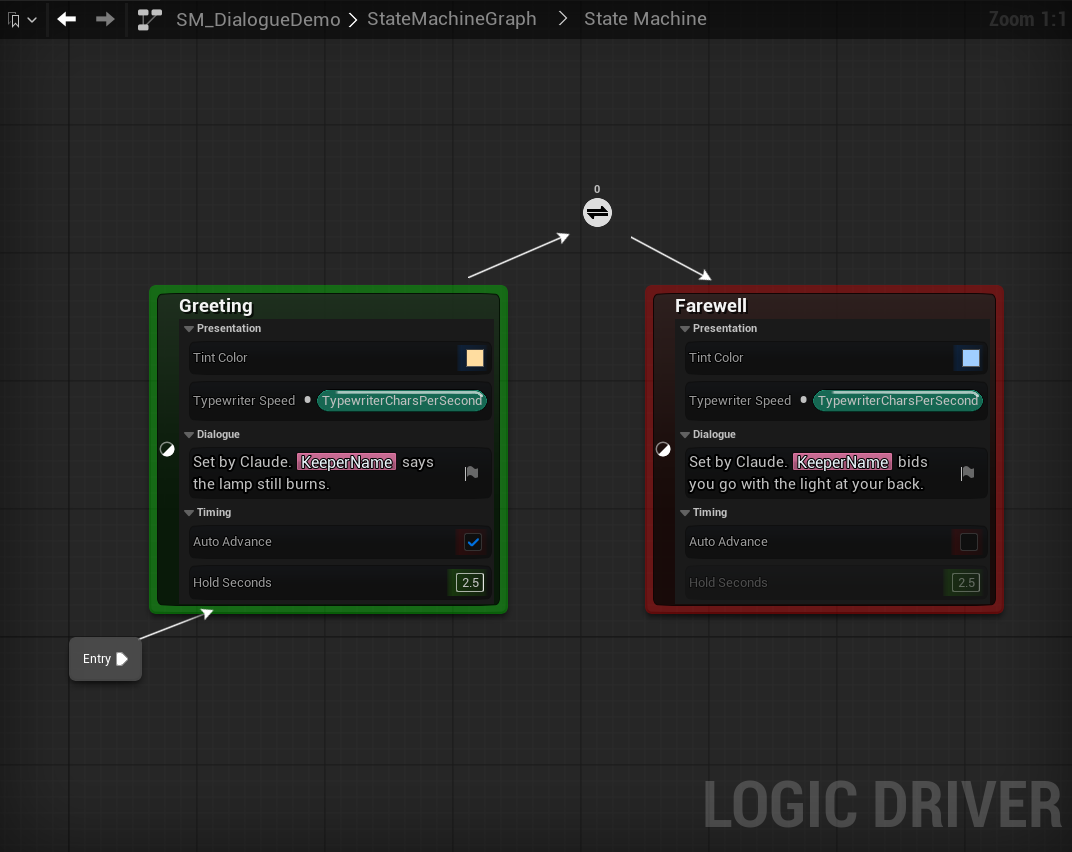
A dialogue state class and a machine using it, both authored through Assist: categorized properties on the class, a text graph on Line reading the machine's KeeperName variable, and a transition reroute node.
The live list is the source of truth
The operation set is still evolving, and each operation carries its own description and input schema. Read them at runtime rather than trusting a static list:
- Console:
LDAssist.Listprints every registered operation, andLDAssist.Describe [operation]prints each one's impact classification and JSON input schema. - Monolith bridge: the
ldnamespace's discovery/query tool lists and describes the operations. - ToolsetRegistry (UE 5.8+):
list_toolsetsanddescribe_toolsetreturn the toolset's functions and their schemas. - Ultimate Engine Co-Pilot: each bridged
ld_*tool carries the operation's description and typed parameters, andget_logic_driver_statusreports how many operations were bridged.
An agent should discover before it authors, and not assume an argument name it has not just read.
Every operation is also classified as read_only or destructive, so a client can decide which calls to auto-approve. Ten operations read without changing anything: ld.list_assets, ld.get_asset, ld.get_node_properties, ld.get_property_pins, ld.get_property_graph, ld.get_local_graph, ld.get_graph_view, ld.find_node_types, ld.runtime_get_state, and ld_ue.read_property. Everything else changes asset, project, or filesystem state and is classified destructive, including purely additive edits and operations whose damage is gated by an argument such as a dry-run flag. See Transports & Bridges for how each transport carries the classification.
Assets and topology
Create and restructure state machine blueprints and the nodes inside them.
- Create and inspect:
ld.create_blueprint,ld.list_assets,ld.get_asset. By defaultld.get_assetreports the root graph and shows a nested state machine as onestate_machine_stateentry;scope="all"walks every nesting level and addsgraph_pathandparent_state_guidto each node. - Add nodes:
ld.add_state,ld.add_transition,ld.add_transition_reroute,ld.add_conduit,ld.add_reference,ld.add_any_state,ld.add_link_state. Each node-adding operation exceptld.add_transitionacceptsparent_state_guidto place the node inside a nested state machine at any depth; transitions stay within one graph and need no extra argument. - Restructure:
ld.remove_node,ld.rename_state,ld.set_initial_state,ld.configure_reference,ld.collapse_to_state_machine,ld.merge_states,ld.replace_node,ld.convert_to_reference. Collapsing moves the selected nodes rather than cloning them, so their guids stay valid, and it returns the container'sgraph_pathand thenode_guidsit now holds. - Build the class:
ld.compile.
See Nested state machines for how these fit together across nesting levels.
Node configuration, conditions, and stacks
Set values and evaluation on the nodes you placed.
- Properties:
ld.set_node_property,ld.reset_node_property,ld.get_node_properties. Aproperty_pathis relative toproperty_nameand must not repeat it. Both write operations refuse a deprecated property, since reflection still resolves it but nothing reads it back. - Node class:
ld.set_node_classassigns or clears the class on an existing state, conduit, transition, or nested state machine node, swapping its node instance template and rebuilding its property graphs. It is the one way to change a class after creation;ld.set_node_propertydeliberately refuses class and object-reference fields. - Conditions:
ld.set_transition_condition,ld.set_conduit_condition. - Stacks:
ld.add_state_stack,ld.add_transition_stackadd extra node-class templates to a state stack or transition stack.
Property graphs and pins
Reach the property graphs behind exposed variables, and split or recombine struct pins for sub-member writes.
ld.get_property_pins,ld.get_property_graph,ld.set_property_graph_edit_mode,ld.split_pin,ld.recombine_pin.
Variables and wiring
Add variables at every level and wire output variables to their destinations.
- Add:
ld.add_sm_variable,ld.add_node_variable,ld.add_blueprint_variable. - Configure and wire:
ld.configure_node_variable,ld.connect_node_variable_output,ld.disconnect_node_variable_output.
Logic Driver node spawners
These wrap Logic Driver's own bound-node spawners. The engine's generic node-placement menu cannot place them, which is why they have dedicated operations.
- Spawn LD nodes into a bound graph:
ld.spawn_local_graph_read_node(state and transition reads such asTimeInState),ld.spawn_local_graph_write_node(transition and conduit evaluation writes),ld.spawn_local_graph_event_node(lifecycle event entries that are absent until spawned, such asOnInitializedorOnTransitionEntered). A state graph is created withOn State Begin,On State Update, andOn State Endalready in it, so the event spawner refuses those three and names the existing node to wire from. - Discover and configure:
ld.find_node_types,ld.configure_transition_event,ld.spawn_actor_context_component.
Bound (local) graph editing
The generic K2 surface for editing a bound graph: the graph behind a transition's CanEnterTransition, a conduit, or a state's OnStateBegin / Update / End. Use it to build inline transition and event logic without opening the graph editor. It resolves the bound graph from a node's guid and edits it directly, so it works even where the engine's generic blueprint tools cannot address a bound graph by name.
- Read:
ld.get_local_graphreturns the graph's nodes and pins plus its result node and pin (the target you wire into). Each node reports both anid(the object name the write operations accept) and anode_guid. Passing a nested state machine's guid enumerates the states and transitions inside it instead. - Place, modify, remove:
ld.add_local_graph_nodeplaces anyUK2Node(a branch, acall_function, a variable get or set, a cast);ld.set_local_graph_noderepositions, comments, or enables an existing one;ld.remove_local_graph_nodedeletes one. - Wire:
ld.connect_local_graph_pinsandld.disconnect_local_graph_pinsjoin or break a link;ld.set_local_graph_pin_defaultseeds a literal on an unwired pin.
See Authoring with an AI Agent for the transition-graph flow these operations implement.
Components and runtime
Configure the state machine component on an actor, and read a running instance.
ld.configure_sm_component_on_actorconfigures aUSMStateMachineComponentthat already exists on an actor blueprint, editing its template so settings persist to every placed instance (it does not add the component).ld.runtime_get_stateintrospects a live PIE instance, reporting the active state.
Layout and visualization
Make generated graphs read like a person laid them out, measure the result, and capture what they look like.
ld.layout_statesruns a layered auto-layout; call it withapply=trueonce, after the last edit. It opens the graph editor itself and measures every node as rendered. It orders each layer from the existing arrangement or from transition priority, and carries any transition that would cross a state on a rail of reroute nodes (route_edges). By default it leaves a graph alone when the computed layout would not improve it, reportingdeclined=true; passonly_if_improved=falseto apply the layout regardless.scope="all"lays out every nested state machine in one transaction, andparent_state_guidstarts from a nested graph instead of the root.ld.get_graph_viewreturns live Slate geometry and colors, and is how to check a layout without a screenshot. Itsoverlapsarray lists every pair of node boxes that intersect. Itstransition_overlapsarray lists transition markers and reroutes stacked on each other. Both are empty when nothing collides. Readmeasurement_warningsfirst, because an empty array on a graph that could not be fully measured means unmeasured rather than clean. A rerouted transition is reported as one segment per reroute node plus one, each carryingsegment_from_guid,segment_to_guid, andprimary_transition_guid, so count transitions byprimary_transition_guidrather than by entries.parent_state_guidmeasures a nested graph.ld.capture_graph_viewwrites the root graph, or a nested graph named byparent_state_guid, to a PNG.ld.capture_local_graphwrites a single node's bound graph (a transition, conduit, or state graph) to a PNG.ld.clear_screenshotscleans them up. A capture is for judging how a graph reads and for showing a result, not for finding collisions.
See Layout for the conventions these operations are meant to satisfy, and for what each layout count in the result means.
The ld_ue.* fallback surface
A small generic-engine surface exists as a fallback only, for the cases the official engine blueprint.* MCP tools cannot express (a TMap/TArray element value, a non-self target object, a dispatcher that must survive compile):
ld_ue.read_property,ld_ue.write_property,ld_ue.add_dispatcher.
These are not Logic Driver operations. Where the engine's own MCP tools are available and suffice, prefer them, and prefer the ld.* operations for anything Logic Driver specific.
Related
- Transports & Bridges: how these operations reach a client, and the contract for exposing them from a bridge you write.
- Authoring with an AI Agent: the conventions that turn this surface into clean, compiling graphs.
- A Dialogue System & the Lighthouse: a larger system authored by prompting an agent, showing where the
ld.*line falls in practice. - What the Calls Look Like: these operations on a small machine, call by call.
- Troubleshooting: what to do when an operation fails or a machine does not run.