What the Calls Look Like  

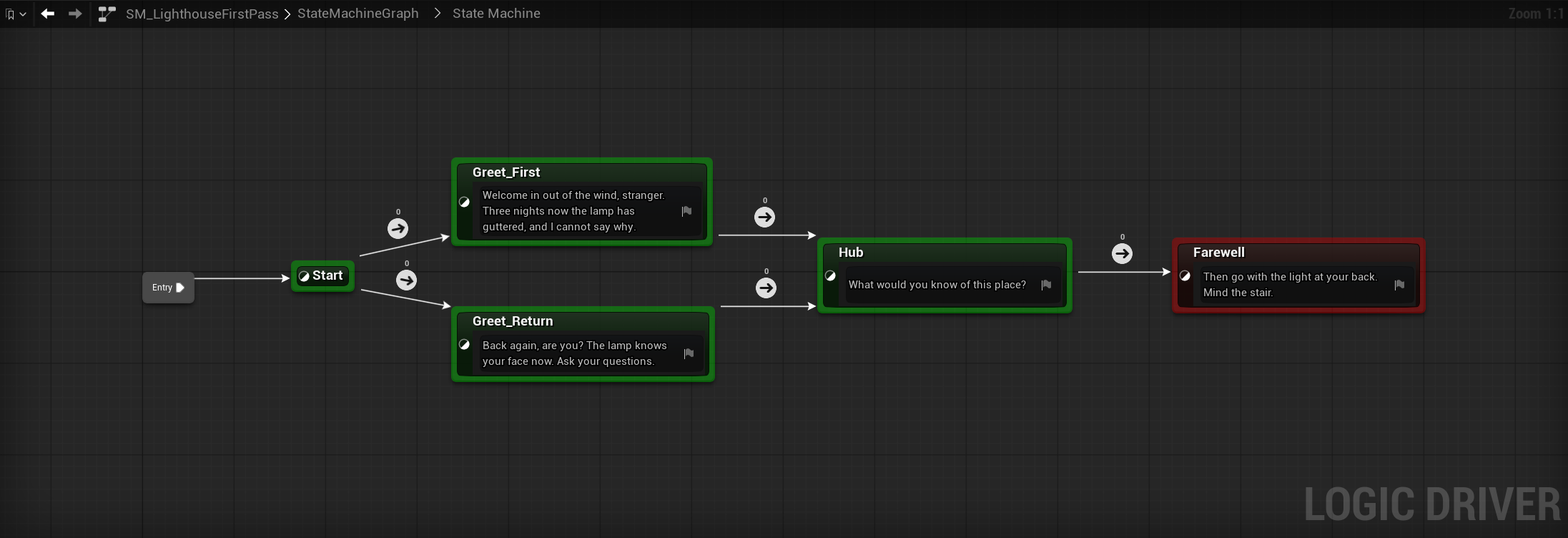
The Lighthouse shows what you say to an agent. This page shows what the agent sends, on a small machine: five states, one variable, and gates written inline in the transitions' own graphs. The call sequences below teach what an operation's schema cannot. They show the order that lets a variable node bind, how a state's own graph is wired, and how a transition gate is built and checked. The graphs are captures of the result, taken with ld.capture_graph_view and ld.capture_local_graph.
Run it by hand, or hand it to an agent
An agent produces this sequence from a prompt like "Build the opening of a lighthouse-keeper conversation in /Game/AssistDocs. Count the visit as it starts, greet a first-time visitor differently from a returning one, join both greetings at a hub, and end on a farewell. Put the keeper's lines on one reusable line state class with a Line text property. Gate everything inline and confirm it compiles." You can also run the operations from the editor console with LDAssist.Exec, substituting the guids and node ids that each call returns. Give your agent the authoring conventions first.
The machine
SM_LighthouseFirstPass counts the visit as it starts, branches the greeting on that count, joins both branches at a hub, and ends. Start carries no node class and raises the counter in its own graph. The four speaking states share one node class, BP_KeeperLine, whose Line property holds what the keeper says. Node-class creation has no ld.* operation, so an agent builds that class with the generic engine blueprint.* tools. Everything below is ld.*.
ld.create_blueprint  {"name":"SM_LighthouseFirstPass","path":"/Game/AssistDocs"}
    -> asset_path  /Game/AssistDocs/SM_LighthouseFirstPass.SM_LighthouseFirstPass
ld.add_sm_variable   {"asset_path":"<asset>","variable_name":"VisitCount","var_type":"int"}
ld.compile           {"asset_path":"<asset>"}

ld.add_state  {"asset_path":"<asset>","state_name":"Start","is_entry":true}
ld.add_state  {"asset_path":"<asset>","state_name":"Greet_First","state_class":"<BP_KeeperLine>"}
ld.add_state  {"asset_path":"<asset>","state_name":"Greet_Return","state_class":"<BP_KeeperLine>"}
ld.add_state  {"asset_path":"<asset>","state_name":"Hub","state_class":"<BP_KeeperLine>"}
ld.add_state  {"asset_path":"<asset>","state_name":"Farewell","state_class":"<BP_KeeperLine>"}

ld.set_node_property {"asset_path":"<asset>","node_guid":"<Greet_First>","property_name":"Line",
                      "value":"Welcome in out of the wind, stranger."}

ld.add_transition {"asset_path":"<asset>","from_state_guid":"<Start>","to_state_guid":"<Greet_First>"}
Four things to notice:
- Thread the returned
asset_pathinto every later call rather than rebuilding it. Every operation afterld.create_blueprinttakes it. - The
ld.compileafterld.add_sm_variableis not optional. Variable nodes resolve against the compiled class, so aget_variableplaced before that compile has nothing to bind to. - Every node is addressed by guid.
ld.add_stateandld.add_transitioneach return one; keep them. Lineis a text graph property. A plain string passed tovaluelands on theFSMTextGraphProperty'sResult.
The ld.add_transition call is repeated for the other four edges (Start to Greet_Return, both greetings to Hub, Hub to Farewell), and ld.set_node_property for the other three lines. A transition with no condition and no transition class never fires, so each of the five edges gets a gate below.
Count the visit in a state's graph
Every state has a bound graph with On State Begin, On State Update, and On State End entry points, reached by the same local-graph operations. Start uses its own to raise the counter:
ld.get_local_graph      {"asset_path":"<asset>","node_guid":"<Start>"}
    -> On State Begin, output exec pin "then"
ld.add_local_graph_node {... "node_class":"get_variable","variable_name":"VisitCount"}
    -> id K2Node_VariableGet_0, output pin "VisitCount"
ld.add_local_graph_node {... "node_class":"call_function","function_name":"Add_IntInt"}
    -> id K2Node_CallFunction_0, pins A, B, ReturnValue
ld.add_local_graph_node {... "node_class":"set_variable","variable_name":"VisitCount"}
    -> id K2Node_VariableSet_0, pins execute, VisitCount, then
ld.set_local_graph_pin_default {... "node_id":"K2Node_CallFunction_0","pin":"B","value":"1"}
ld.connect_local_graph_pins {... K2Node_VariableGet_0.VisitCount  -> K2Node_CallFunction_0.A}
ld.connect_local_graph_pins {... K2Node_CallFunction_0.ReturnValue -> K2Node_VariableSet_0.VisitCount}
ld.connect_local_graph_pins {... On State Begin.then -> K2Node_VariableSet_0.execute}
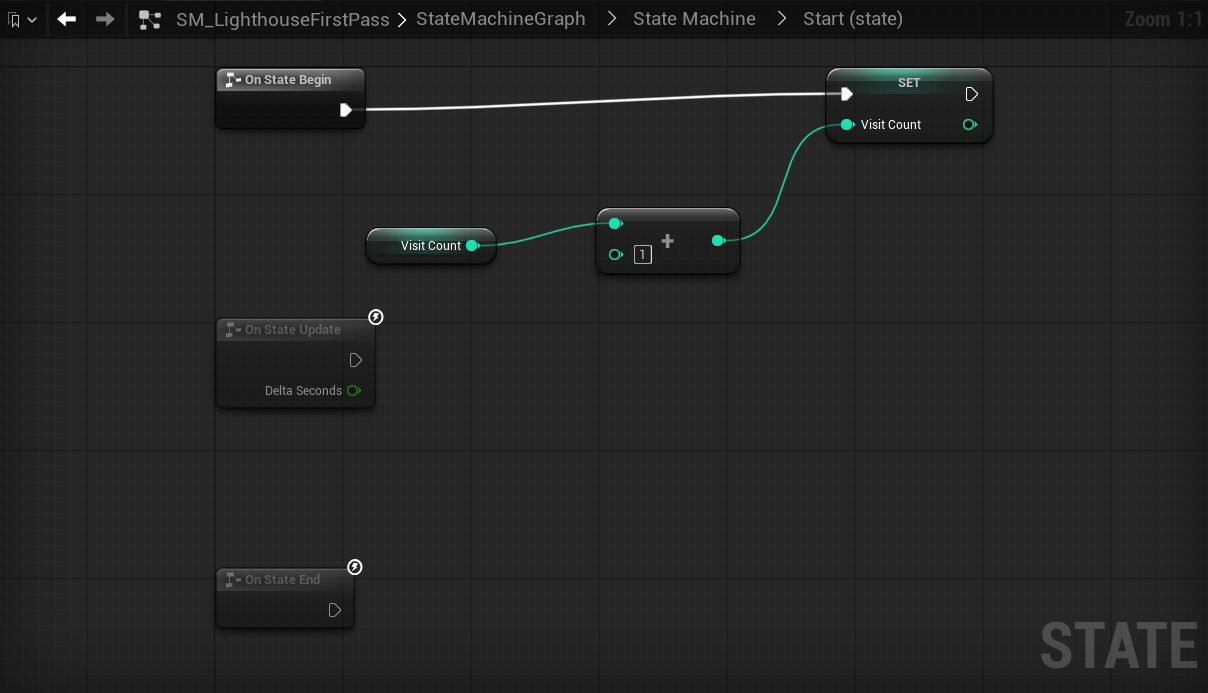
A state graph has no boolean result pin, so you wire from the On State Begin exec output rather than into a condition. On State Update and On State End sit below, dimmed, because nothing is wired to them.
This is the step an agent is most likely to skip, and skipping it leaves a machine that compiles but never varies. A gate that reads a variable does nothing until something writes it. See Feed the variables a gate reads.
Gate a transition inline
The two edges out of Start read the counter and compare it differently. Read the graph to find its result pin, place a getter and a comparison, seed the literal, and wire the comparison into the result:
ld.get_local_graph      {"asset_path":"<asset>","node_guid":"<Start->Greet_First>"}
    -> result  SMGraphK2Node_TransitionResultNode_0.bCanEnterTransition
ld.add_local_graph_node {... "node_class":"get_variable","variable_name":"VisitCount"}
ld.add_local_graph_node {... "node_class":"call_function","function_name":"EqualEqual_IntInt"}
ld.set_local_graph_pin_default {... "pin":"B","value":"1"}
ld.connect_local_graph_pins    {... K2Node_VariableGet_0.VisitCount  -> K2Node_CallFunction_0.A}
ld.connect_local_graph_pins    {... K2Node_CallFunction_0.ReturnValue -> <result>.bCanEnterTransition}
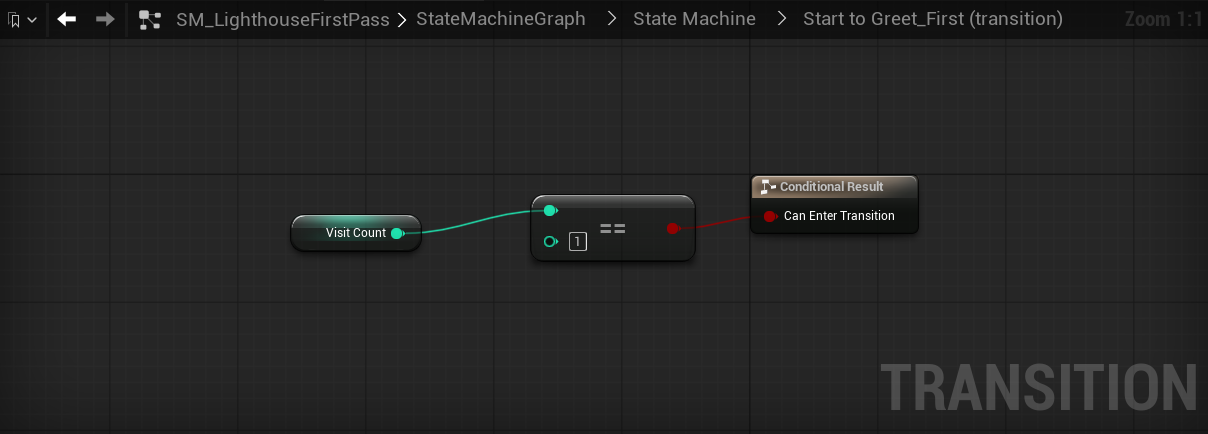
The Start to Greet_Return edge is the same six calls with Greater_IntInt in place of EqualEqual_IntInt. Because Start raises the counter before either edge evaluates, the first visit reads 1 and a returning visit reads more.
ld.get_local_graph also returns the graph as structured data, which is what an agent reads to confirm its own wiring:
graph: Start to Greet_First | result: SMGraphK2Node_TransitionResultNode_0.bCanEnterTransition
  Get VisitCount .VisitCount            -> Equal (Integer).A
  Equal (Integer) (EqualEqual_IntInt)    B = 1, ReturnValue -> Conditional Result.bCanEnterTransition
Gate on time in state
The remaining edges hold each line long enough to read. That gate reads time rather than a variable, so it uses a Logic Driver node the engine's generic placement menu cannot reach, which is what ld.spawn_local_graph_read_node is for:
ld.spawn_local_graph_read_node {"asset_path":"<asset>","node_guid":"<Greet_First->Hub>",
                                "type":"TimeInState"}
    -> id SMGraphK2Node_StateReadNode_TimeInState_0, output pin "TimeInState"
ld.add_local_graph_node        {... "node_class":"call_function","function_name":"Greater_DoubleDouble"}
ld.set_local_graph_pin_default {... "pin":"B","value":"0.6"}
ld.connect_local_graph_pins    {... TimeInState_0.TimeInState -> K2Node_CallFunction_0.A}
ld.connect_local_graph_pins    {... K2Node_CallFunction_0.ReturnValue -> <result>.bCanEnterTransition}
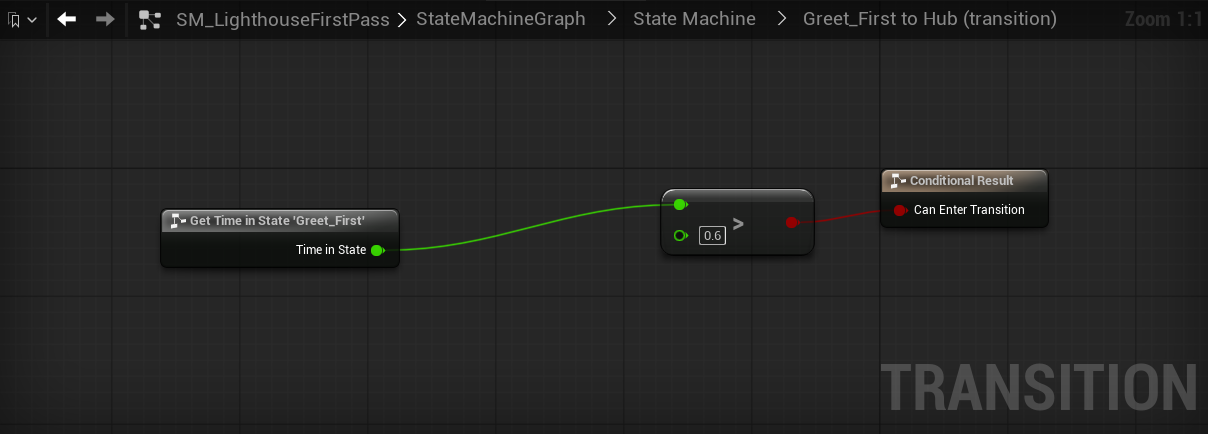
Repeat for Greet_Return to Hub and Hub to Farewell, with a threshold that suits each line.
Five inline gates is fine on a machine this small. When the same comparison is copied onto every edge of a larger one, factor it into a transition class with exposed data and set that class once per edge with ld.add_transition. That is the split the dialogue system uses: the gates every conversation shares live in reusable transition classes, and the gates that belong to one conversation stay inline.
Lay it out and compile
ld.layout_states with apply=true arranges the states left to right. Compiling is the expensive step, so do it once at the end rather than per edit:
ld.layout_states {"asset_path":"<asset>","apply":true}
ld.compile       {"asset_path":"<asset>"}  -> has_errors:false, has_warnings:false, up_to_date:true
ld.layout_states opens the graph editor itself and spaces states by their rendered size, so one call after the last edit is enough. To confirm the result without a screenshot, call ld.get_graph_view and check that measurement_warnings, overlaps, and transition_overlaps are all empty. A capture is for reading the graph, which those arrays cannot judge.
A clean compile means the class is built, not that the machine plays. To watch it run, put the machine on an actor's state machine component, place the actor in a level, start PIE, and read the live state with ld.runtime_get_state. The component is set up in the editor by hand rather than through an ld.* call; see Components and running the machine.
Related
- A Dialogue System & the Lighthouse: the full conversation built from prompts, with the gates factored into reusable classes.
- Advanced Features: camera beats and an animation beat layered onto that conversation.
- What You Can Author: the full operation surface, including the bound-graph editing operations used here.
- Authoring with an AI Agent: the conventions that keep an agent's output clean and compiling.
- Troubleshooting: fixes for the failures this flow is designed to avoid.