A Dialogue System & the Lighthouse  

You do not normally drive Logic Driver Assist by typing ld.* calls. You describe what you want to an agent and review what it built. This page gives you two prompts to copy. The first builds a dialogue system: the reusable classes and widget every conversation in your game runs on. The second authors one conversation, a branching talk with a lighthouse keeper, as data on that system.
Describe the system, not the session. An agent given a short prompt builds the smallest thing that satisfies it, and you spend the rest of the session steering. An agent given one long prompt that names every behavior the player sees, and every piece meant to be reused, builds the whole system at once. The prompts below are long for that reason.
About the screenshots
The screenshots on this page come from one run of the prompts below. The assets are not part of the plugin. Run the prompts in your own project to produce them, and expect small differences in names and layout.
The dialogue system prompt
Give the agent the authoring conventions in its session instructions, then:
Using the Logic Driver Assist operations and the engine tools, build a reusable dialogue system in a fresh folder
/Game/DialogueSystem. This system will drive every conversation in the game, so build it as generic, conversation-agnostic classes. Individual conversations will be authored later as their own state machine assets whose nodes only carry data: who is speaking, what they say, and what the player can choose.
- A conversation is a Logic Driver state machine. Each speaking beat is a state that carries its data on the node itself, editable per-state in the graph editor: the speaker's display name and the line text. Create a dialogue line state class for this.
- Dialogue displays on screen in a UMG widget, not as printed debug text. Create a dialogue widget showing: the speaker name, the line text, a small "continue" hint, and three choice buttons, each with its own label text, hidden whenever the current beat offers no choices.
- The player advances an ordinary line by pressing Space. A line holds on screen until the player advances; never advance on a timer. One press advances exactly one beat, even if the next beat would also accept it. A press made during a beat that does not advance on input must not carry over into the next line: a line state discards any pending press when it begins.
- A choice beat is a hub state that presents up to three labeled choices on the widget's buttons (unused slots hidden). Clicking a button picks that choice and the conversation takes the matching branch. The choice buttons must never take keyboard focus, so a Space press cannot activate one. Create a choice hub state class whose per-node data is the choice labels, and a reusable transition class for "the player picked choice N", where N is data on the edge.
- Create a reusable transition class for "the player advanced" for line-to-line edges.
- A conversation can include another conversation asset as a nested sub-conversation (a state machine reference), with a reusable transition class for "the nested conversation has finished" on the edge leaving it.
- A dialogue host actor runs conversations: it has a state machine component whose conversation asset is assignable, creates the dialogue widget on begin play, shows the mouse cursor and routes input so both the Space key and button clicks work, and starts the conversation only after the widget exists. States and transitions reach the widget and the player's recorded input through this host (the machine's context), so the same classes serve any conversation on any host without editing the classes.
- Wire the data flow: entering a line state pushes its speaker and line to the widget and hides the choices; entering a hub state pushes its labels and shows its buttons; the player's advance and choice input is recorded on the host, and the transition classes read it and consume it when they fire.
- Prove the system with a small smoke conversation
SM_SystemSmokein the same folder: two lines from two different speakers, then a two-choice hub where choice 1 leads to one more line and then the end, and choice 2 ends immediately. Place a host in a test level wired to run it.Lay the graphs out cleanly, compile everything clean, save everything, and then verify in play-in-editor: the widget shows the first line, Space advances through the lines, the hub shows two buttons, and clicking each button takes its branch.
Everything the player experiences is named. Dialogue displays in a widget. A line holds until the player advances it, and one press advances one beat. A choice is a click on a labeled button. Conversations can nest. Everything meant to be reused is named as a class. What you leave unsaid, the agent decides, and it decides toward the smallest valid reading.
What the system prompt produces
The folder holds a complete, running system:
| Piece | Kind | What it carries |
|---|---|---|
BP_DialogueLineState |
State class | SpeakerName, LineText, editable on the node. Entering the state pushes both to the widget and hides the choices. |
BP_DialogueChoiceHub |
State class | Three choice labels, editable on the node. Entering pushes the labels and shows the buttons; an empty label collapses its button. |
BP_Transition_PlayerAdvanced |
Transition class | Fires when the player has advanced; consumes the press so one press moves one beat. |
BP_Transition_ChoicePicked |
Transition class | Per-edge ChoiceIndex. Fires when the player clicked that button; consumes the choice. |
BP_Transition_ConversationFinished |
Transition class | Fires when the nested conversation on the state behind it reaches its end state. |
WBP_Dialogue |
Widget | Speaker, line, continue hint, three buttons. Clicks report back to the host. |
BP_DialogueHost |
Actor | The state machine component, the widget's owner, and the input recorder the transition classes read. |
SM_SystemSmoke |
Conversation | The system's proof: two lines, a two-choice hub, two endings, all data on the nodes. |
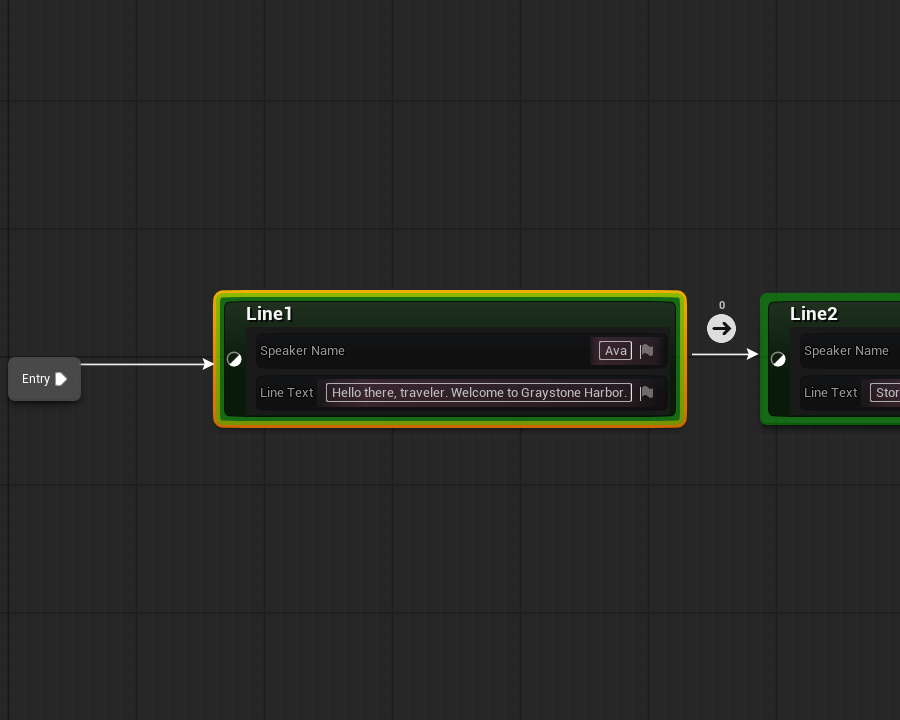
"Editable on the node" is literal. A line state's speaker and text sit on the node body in the graph editor:
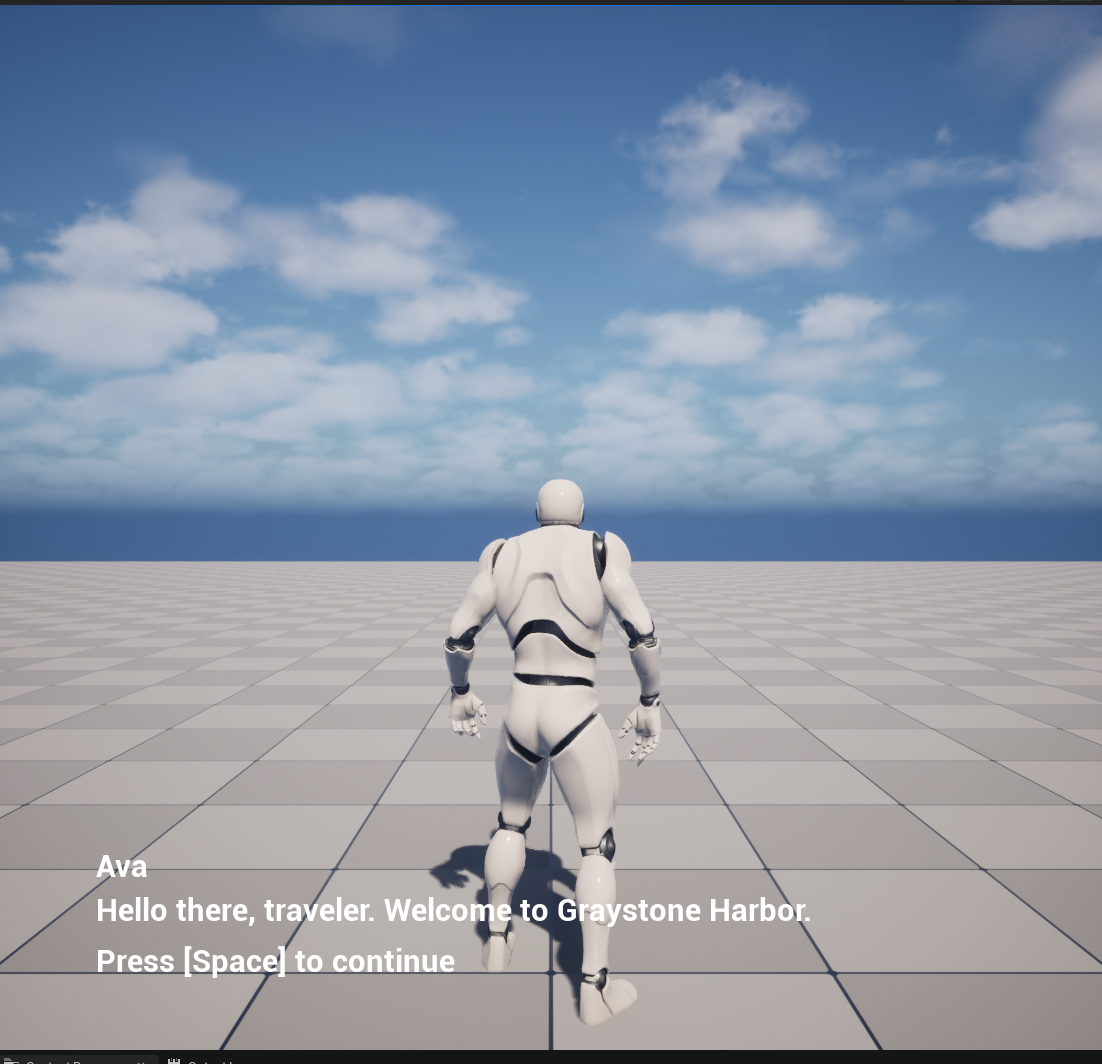
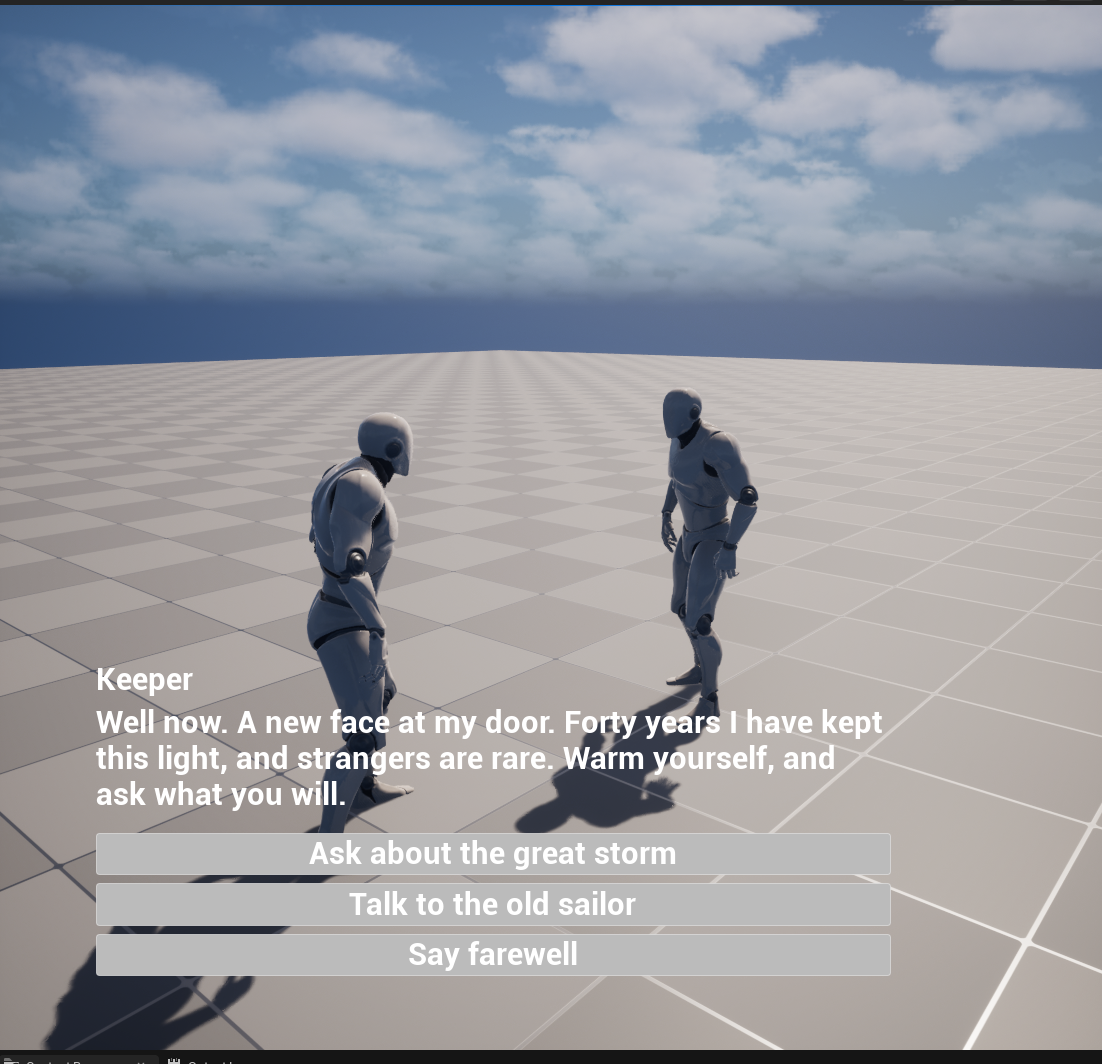
In play, the widget shows that data and holds until the player advances:
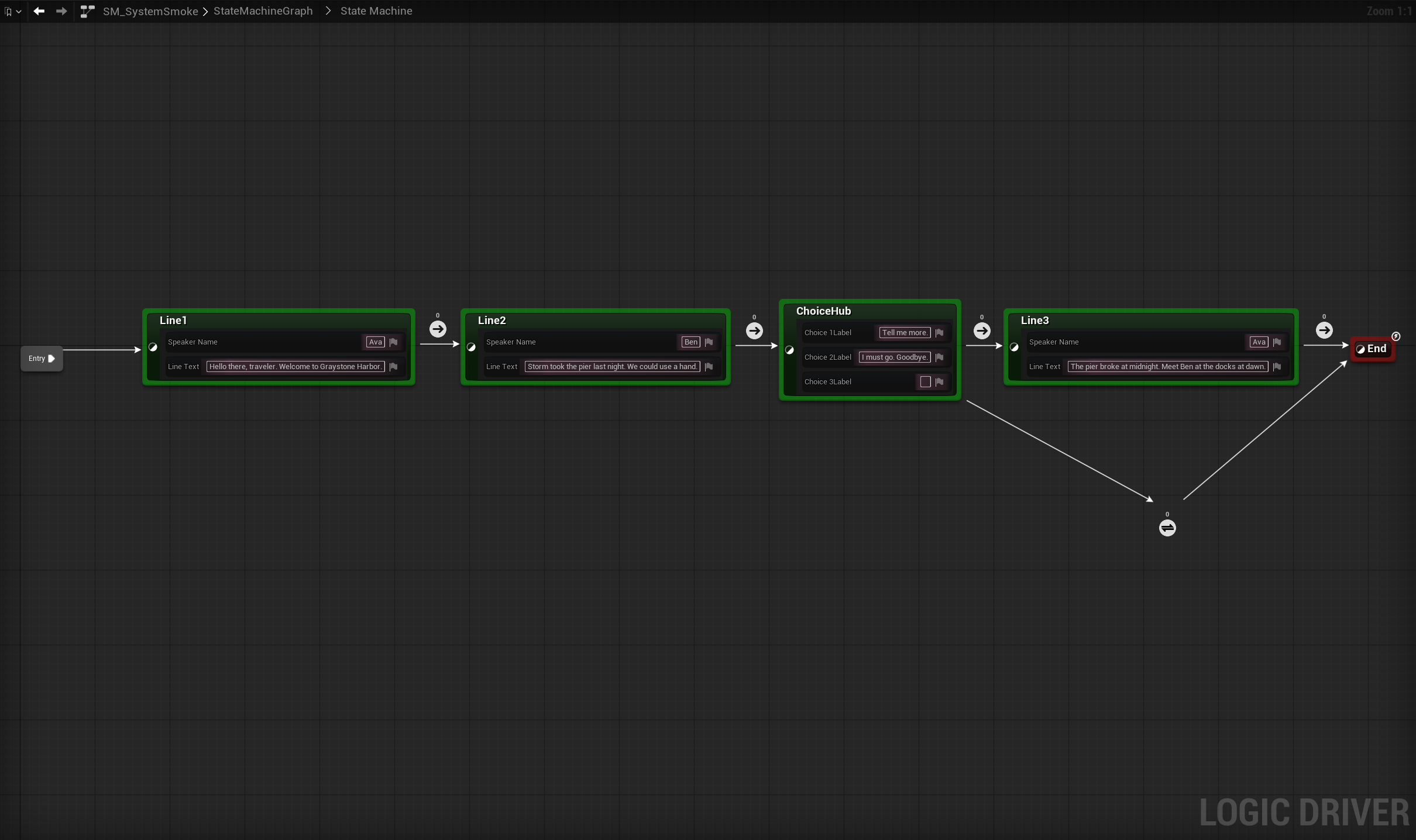
stateDiagram-v2
    [*] --> Line1
    Line1 --> Line2 : PlayerAdvanced
    Line2 --> ChoiceHub : PlayerAdvanced
    ChoiceHub --> Line3 : ChoicePicked 1
    ChoiceHub --> End : ChoicePicked 2
    Line3 --> End : PlayerAdvanced
    End --> [*]

    Line1 : Line1 (Ava)
    Line2 : Line2 (Ben)
    ChoiceHub : ChoiceHub (two labels, third empty)
    Line3 : Line3 (Ava)
Three behaviors to check for in your own build:
- Input is recorded, then consumed. The host stores a Space press or a button click as pending input. The transition classes read it in their condition and clear it when the edge fires, so one press advances one beat. A line state also clears any pending press when it begins, so a press made during a beat that ignores input cannot skip the line that follows.
- Space never clicks a button. The choice buttons are not focusable. If they were, a Space press on a hub would pick a choice as well as advance.
- The machine starts after the widget exists. A component that starts on begin play starts before the host actor has created its widget, so the first line would display nothing. The host starts the machine explicitly at the end of its begin-play chain. If your first line ever vanishes, check this ordering first.
For the agent: the calls behind the system
The Logic Driver work is all ld.*: ld.create_blueprint for the smoke conversation, ld.add_state with the line and hub classes and their per-node text via ld.set_node_property, ld.add_transition with the gate classes and per-edge ChoiceIndex, ld.layout_states, ld.compile. The pieces around it use the generic surfaces: blueprint.* creates the five node classes (subclasses of SMStateInstance / SMTransitionInstance) and the host actor, and wires their graphs; ui.* builds the widget tree and its show/hide functions; editor.* places the host and saves the level. The node classes reach the host with GetContext plus a cast, so nothing holds a hard reference to a level or a conversation. There is no input-event node on the generic surface, so the host polls WasInputKeyJustPressed on tick.
The generic-surface limits an agent meets on this path are listed under Known gaps on the Monolith surface.
The Lighthouse conversation prompt
With the system in place, a conversation is a much smaller ask. This is the prompt shape you reuse every time your game needs another one: point at the system, describe the conversation, write the dialogue's intent. The agent inspects the system's classes to learn their property names, so the prompt does not restate them.
A reusable dialogue system already exists at
/Game/DialogueSystem(the line and hub state classes, the advance/choice/finished transition classes, the widget, and the host actor). Inspect those assets to learn their exact property names and behavior. Do not modify any of them.Using only those system classes for dialogue behavior, author a branching conversation in
/Game/DialogueSystem/Lighthouse: a talk with a lighthouse keeper.
- The keeper greets a first-time visitor differently from a returning one: the conversation remembers how many times it has looped back to its start, and the greeting changes on later passes. Author whatever this needs (the counter, its writer, and the two greeting gates) as part of the Lighthouse folder; it is this conversation's own logic, not a system class.
- After the greeting, a hub offers three choices: hear about the storm, talk to the sailor, or say farewell.
- The storm choice: the keeper tells a short storm tale (two lines, advanced by the player like any line), then the conversation loops back to the start.
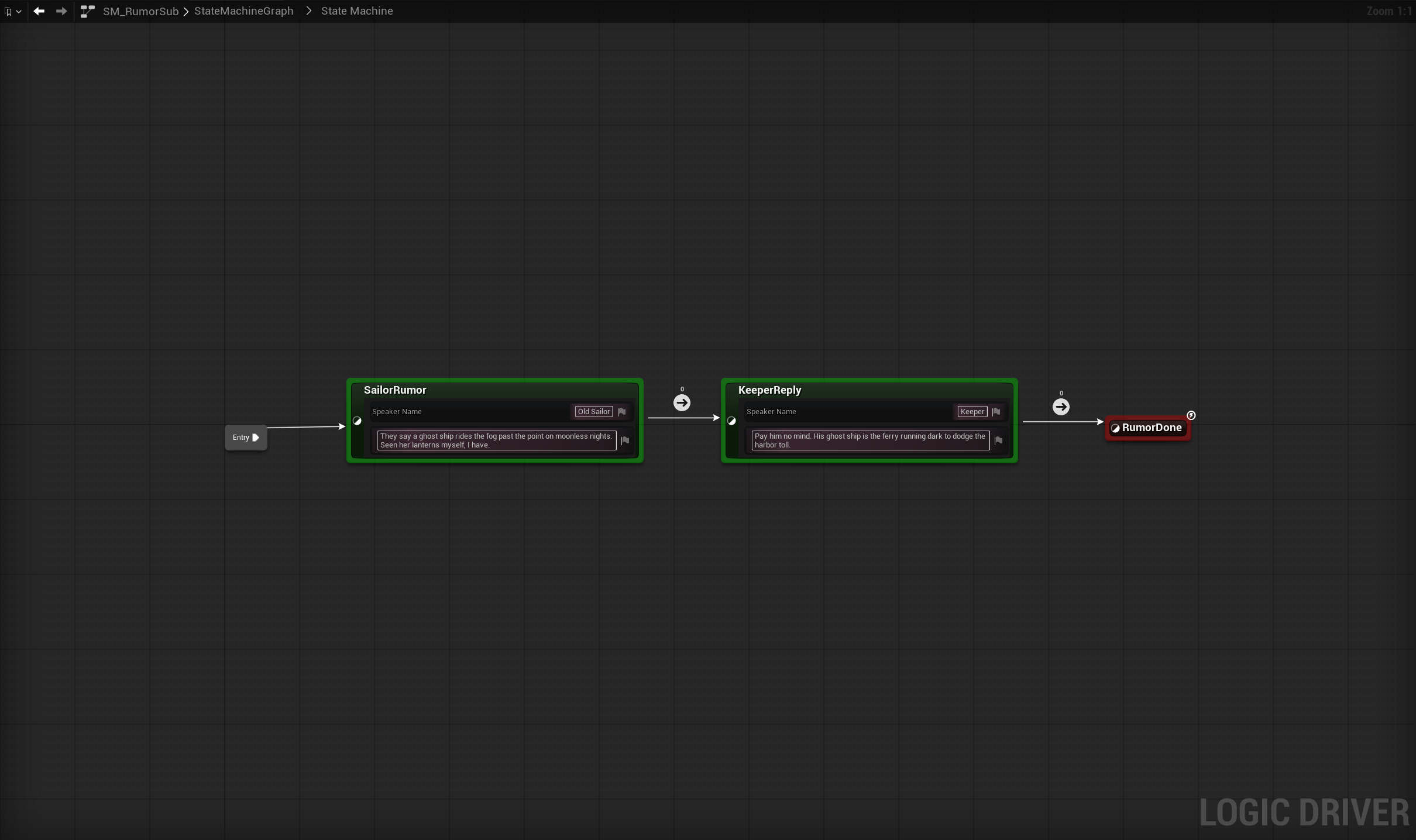
- The sailor choice: a separate, reusable rumor conversation asset
SM_RumorSub(two lines, sailor then keeper) plays as a nested sub-conversation, then the talk loops back to the start.- Farewell: the keeper says a goodbye line and the conversation ends.
- Write real dialogue for every line: a weathered lighthouse keeper, a first-time greeting, a returning greeting, a two-line storm tale, the sailor's rumor and the keeper's reply, a farewell.
- Set up a level with a placed dialogue host running the Lighthouse conversation, without breaking the smoke-test level.
Lay the graphs out cleanly (route any loop-back edge as a rail rather than crossing the flow), compile clean, save everything, and verify in play-in-editor by walking every branch.
What the conversation prompt produces
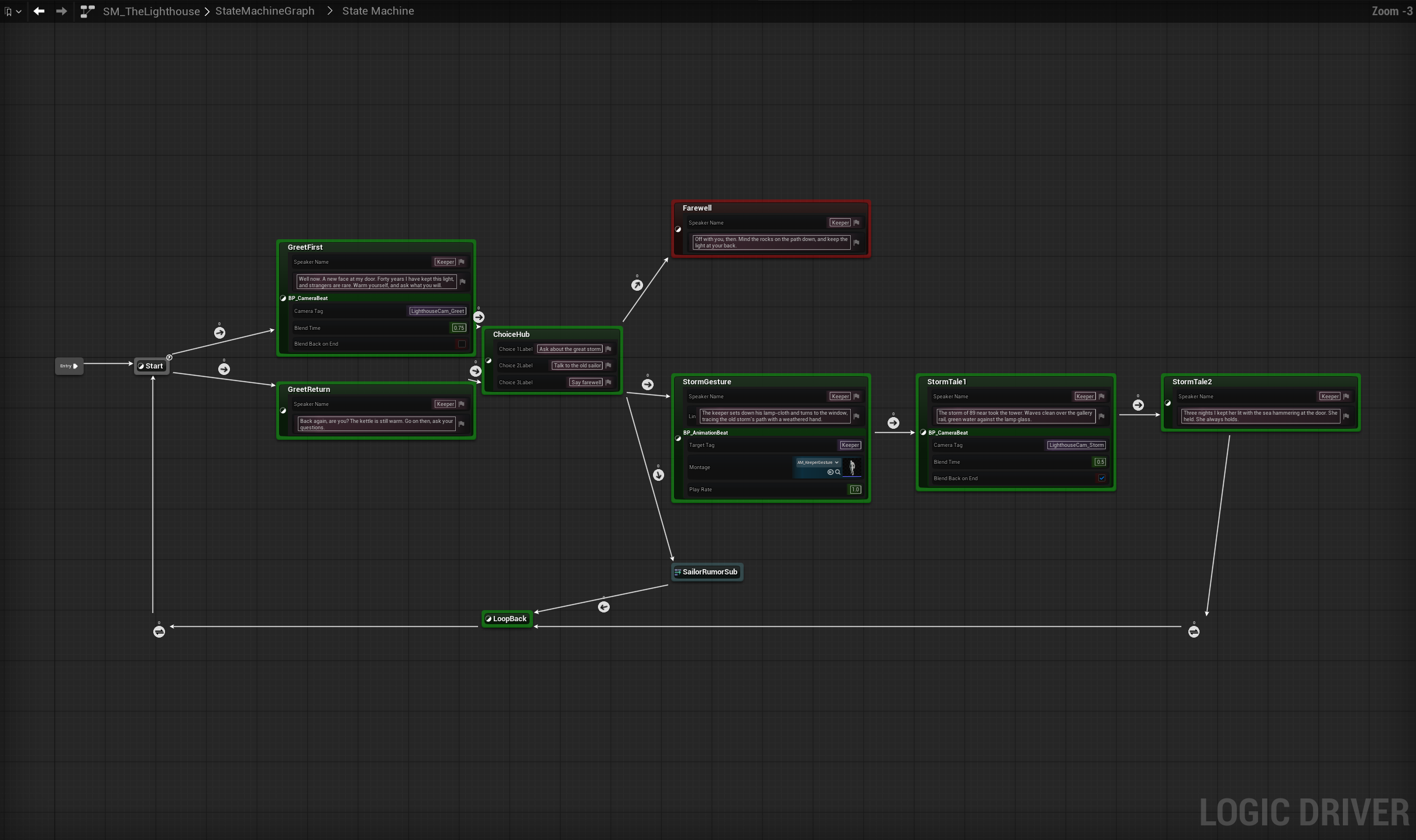
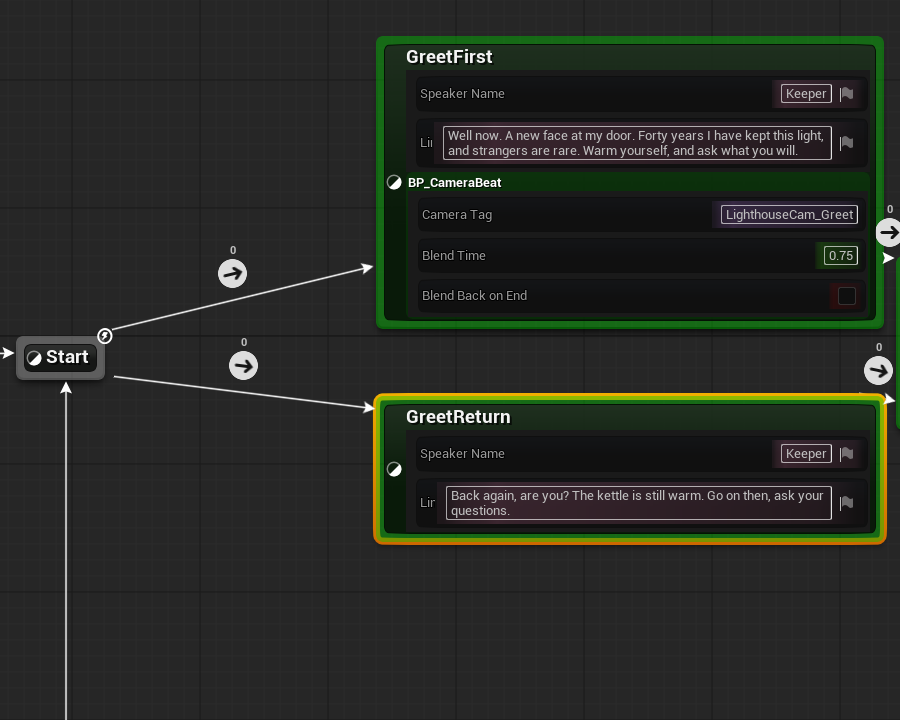
This is the finished root graph. The capture was taken after the Advanced Features page added its camera and animation beats. It therefore shows a StormGesture state and stacked entries that this prompt alone does not create:
What this page's prompt returns on its own:
stateDiagram-v2
    [*] --> Start
    Start --> GreetFirst : VisitCount == 0
    Start --> GreetReturn : VisitCount > 0
    GreetFirst --> ChoiceHub : PlayerAdvanced
    GreetReturn --> ChoiceHub : PlayerAdvanced
    ChoiceHub --> StormTale1 : ChoicePicked 1
    ChoiceHub --> SailorRumorSub : ChoicePicked 2
    ChoiceHub --> Farewell : ChoicePicked 3
    StormTale1 --> StormTale2 : PlayerAdvanced
    StormTale2 --> LoopBack : PlayerAdvanced
    SailorRumorSub --> LoopBack : ConversationFinished
    LoopBack --> Start : always (increments VisitCount)
    Farewell --> [*]

    Start : Start (empty branch point)
    LoopBack : LoopBack (empty counter writer)
    SailorRumorSub : SailorRumorSub (reference to SM_RumorSub)
    Farewell : Farewell (end)
The conversation is instance data on the system. The only logic authored here belongs to this conversation. A VisitCount variable on the machine is written by an empty LoopBack state that both return paths converge on, and read by two inline gates out of the start state. Every line and label lives on a node:
Three details to check for in your own build:
- The sub-conversation ends on an empty terminal state. The "conversation finished" gate fires when the reference reaches its end state. If the last spoken line were the end state, the parent would leave it the moment it appeared. An empty state after the last line makes the sub-conversation finish only after the player advances past the reply.
- The loop counts itself. Both return paths converge on one empty
LoopBackstate whose entry increments the counter, then an unconditional edge returns to the start. One writer, no double counting. - Each placed host picks its conversation. The host's component template stays pointed at the smoke conversation. The Lighthouse level's placed host overrides the machine on its own component instance.
For the agent: the calls behind the conversation
All of it is the ld.* surface, because the system classes already exist: ld.create_blueprint twice, ld.add_state with the system's state classes (plus the empty Start, LoopBack, and end states), ld.add_reference for the nested rumor, ld.add_transition carrying the system's gate classes with per-edge ChoiceIndex, ld.add_sm_variable for VisitCount, ld.set_node_property for every line and label, the greeting gates authored inline with the bound-graph ops (ld.get_local_graph, ld.add_local_graph_node with EqualEqual_IntInt / Greater_IntInt, ld.connect_local_graph_pins), the counter written off LoopBack's On State Begin, ld.layout_states, ld.compile. The only non-ld steps are placing the host and saving the level (editor.*), and overriding the placed component's machine per instance, which has no operation and is done with a two-line editor python snippet.
ld.layout_states carries the loop-back edge on a rail of reroute nodes when its straight wire would cross a state, so a fresh run needs no hand-placed reroutes. Confirm with ld.get_graph_view; its overlaps array is empty when nothing collides. Engine comparison functions have K2 names (EqualEqual_IntInt, not Equal_IntInt); the error message lists the fix.
After the first run
The classic first-run failures are all behaviors: a choice nothing writes, lines that advance on timers, a machine that starts before its widget exists. Naming the behavior in the prompt prevents them. What remains for your eye:
- Read the graph back. Dialogue states carrying visible property widgets are far taller than plain states.
ld.get_graph_viewreports overlapping nodes and stacked transition markers without a screenshot; a capture shows whether the graph reads well. If the agent did not check both, one prompt is enough: "check the root graph for overlaps, then capture it and fix any crossing edges". - Tune feel by prompt. Numbers like a blend duration or where a camera sits are taste, not correctness. Run it, then say what you saw: "ease into the framed angle over about three quarters of a second" is a complete refinement prompt.
- Anything you left unsaid is built minimal. If a behavior is missing, the fix is usually a sentence naming it, not a redesign.
Related
- Advanced Features: camera beats and an animation beat layered onto this conversation with the same stacked-class pattern.
- Authoring with an AI Agent: the conventions to paste into your agent so the first pass comes out clean.
- What You Can Author: the operation surface behind these prompts, and where the
ld.*line falls. - What the Calls Look Like: the operations themselves, on a small machine.
- Troubleshooting: symptom-first fixes when a graph does not run or an operation fails.