States
States serve as the fundamental building blocks of logic within a state machine.
States can be:
-
States
Contain
Begin,Update, andEndentry points and are used for general logic while active. -
State Machines
States which can contain states and transitions. When active, their state machine will execute.
-
Conduits
Conduits can be configured as a state or transition and won't continue until their condition passes.
-
State Machine References
State machines that exist in another blueprint but function the same as nested state machines.
-
Any States
Special nodes which represent any other state in the current FSM scope.
-
Link States
Special nodes which represent a specific state in the current FSM scope.
State
States are generally where any blueprint logic should go.
On State Begin
Once a state is entered the Begin logic will execute and will not execute again unless the state is re-entered.
On State Update
This occurs every tick the state is active and the Delta Seconds from the last tick is passed in. If you manage state updates on your own and don't pass in delta seconds, the state machine instance will attempt to calculate the delta.
On State End
Always occurs when a state ends. This will trigger before any Transition Entered logic plays or the next state starts.
On Root State Machine Start
Optional node which fires when the owning state machine blueprint starts.
On Root State Machine Stop
Optional node which fires when the owning state machine blueprint stops.
On State Initialized
Optional node which fires right before the state begins. This occurs before outgoing transitions initialize.
On State Shutdown
Optional node which fires after the state has ended. This occurs after outgoing transitions have shutdown.
Access Node Blueprints and Variables  

State Instance
Call GetNodeInstance in the local graph to get access to the state instance. This call is equivalent to a self reference in a custom state class and allows you to retrieve variables that the state might set. No cast is necessary, the result is already cast correctly.
Transition Nodes
Call GetOutgoingTransitions from the state instance to retrieve all outgoing transition instances. This is an array ordered by transition priority and each element will have to be cast to the correct transition class.
Call GetIncomingTransitions from the state instance to retrieve all incoming transition instances. This is an array ordered by transition priority and each element will have to be cast to the correct transition class.
General Properties
Clicking on a state will let you configure any properties of that state.
Always Update
Ensures that the On State Update method is always called at least once before exiting a state. Without this it is possible the update method may not be called in the scenario where a state starts and then on the next tick it completes.
Disable Tick Transition Evaluation
Prevents transitions leading out of the state from being evaluated per tick.
Exclude from Any State
Prevents the Any State node from adding transitions to this node.
Eval Transitions on Start
Allows outgoing transitions to be evaluated on the same tick as On State Begin.
State Machine
It is possible to nest state machines as many times as you want. Priority is given to the super state so you may want to have transitions leading out of the nested State Machine wait for its completion. There is a helper blueprint node: Is State Machine in End State which is perfect for this, but requires the nested state machine have an end state.
Hierarchical State Machine Example
Super state machine A (super A) changes states to sub state machine B (sub B). Once sub B becomes active it will start the first state of sub B. On the next tick super A transitions are evaluated first. If a transition out is active it will then call On State End on sub B triggering On State End of sub B's nested state.
Properties
Wait for End State
No outgoing transitions will be evaluated until the state machine has reached an end state.
This is more efficient then having a transition check for end state status.
Reuse Current State
- When true the current state is reused when the state machine exits and restarts.
- When false the current state is cleared on end and the initial state used on start.
References will inherit this behavior.
Reuse if Not End State (Requires ReuseCurrentState)
Do not reuse if in an end state.
References will inherit this behavior.
Link State
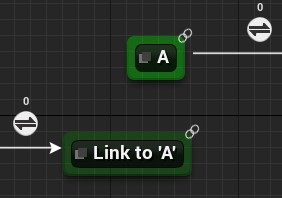
Link states serve as a one way reference to another state in the same FSM scope. They are to organize graphs and are not distinguishable at run-time.
When a state is linked a chain icon will appear above the Link State and the target state.
Select the Link State and in the details panel choose the target state to establish a link.
Hotkeys 
Shortcut keys can be defined in the BaseEditorPerProjectUserSettings.ini config file, under the LogicDriverSpawnNodes section, to spawn states in Logic Driver state machines. Hold the key down as you left click.
[LogicDriverSpawnNodes]
# Any state node
+Node=(Class=/Script/SMSystem.SMAnyStateInstance Key=A Shift=false Ctrl=false Alt=false)
# Standard state
+Node=(Class=/Script/SMSystem.SMStateInstance Key=S Shift=false Ctrl=false Alt=false)
# Standard state machine
+Node=(Class=/Script/SMSystem.SMStateMachineInstance Key=S Shift=true Ctrl=false Alt=false)
# Custom blueprint state
+Node=(Class=/Game/StateMachines/ClassesRoom/CustomNodes/PrintTextState.PrintTextState_C Key=P Shift=false Ctrl=false Alt=false)
# Custom native state
+Node=(Class=/Script/SMSystemTests.SMStatePropertyResetTestInstance Key=V Shift=false Ctrl=false Alt=false)
